
⚡ Quick Answer: ChatGPT vs Gemini
ChatGPT (running on GPT-5.5) is the better all-around AI assistant in 2026, with stronger writing quality, reasoning, and coding performance. Google Gemini (running on Gemini 3.1 Pro) is the better choice for Google Workspace users, video and audio analysis, and cost-sensitive API use, thanks to its native multimodal processing and 2.5x lower per-token API cost. Most professional users benefit from running both.
At a Glance
| – | ChatGPT (GPT-5.5) | Gemini (3.1 Pro) |
|---|---|---|
| Best for | Writing, reasoning, coding | Workspace integration, multimodal, cost |
| Paid tier price | $20/month (Plus) | $19.99/month (AI Pro) |
| Context window | Up to 1M tokens | Up to 1M–2M tokens |
| Native video/audio | No | Yes |
| API cost (per 1M tokens) | $5 in / $30 out | $2 in / $12 out |
| Intelligence Index | ~59–60 | ~57 |
The Verdict Upfront: Which One Should You Use?
Most comparison articles make you read 3,000 words before giving you an answer. Here is the answer first.
If You Want One Answer
For most people: ChatGPT. It produces better writing, more reliable step-by-step reasoning, and broader third-party integrations. GPT-5.5 — the model powering ChatGPT as of June 2026 — leads Gemini 3.1 Pro on the Artificial Analysis Intelligence Index (approximately 59–60 vs. 57, depending on evaluation date) and outperforms it on the coding benchmarks that matter most to professional workflows.
For Google Workspace users and multimedia tasks: Gemini. If Gmail, Docs, Drive, and Sheets are where you work every day, Gemini’s native integration makes it a meaningfully better tool. It also handles video and audio natively — something ChatGPT still cannot do.
When ChatGPT Wins
- You need polished, publication-ready writing on the first draft
- Complex multi-step reasoning and debugging are core to your work
- You use computer use (desktop automation) or a broad plugin ecosystem
- You want GPT-5.5 Thinking mode for hard problems at the $20/month tier
- You are a developer building on a mature, widely-supported API
When Gemini Wins
- You live in Google Workspace and want AI that works inside your existing tools
- You analyze video, audio, or large document sets that exceed 400K tokens
- You need the cheapest capable paid tier ($4.99/month via Google AI Plus)
- Your API budget is tight — Gemini 3.1 Pro is 2.5x cheaper per output token than GPT-5.5
- Real-time, web-grounded information accuracy matters more than writing style
When Either Will Do
For standard everyday tasks — summarizing articles, drafting emails, answering questions, explaining concepts — both tools perform at a level that makes the choice largely irrelevant. If you are a casual user on a free plan, try both for two weeks and pick the one that feels more natural to use. The interface gap matters more than the model gap at that usage level.
When You Should Avoid Both
Neither tool is the right choice if your task requires guaranteed factual accuracy with zero tolerance for error and no time to verify — legal filings, medical diagnoses, financial audits, or anything where a hallucinated detail carries real consequences. Both tools are drafting and reasoning aids, not authoritative sources. If your workflow doesn’t include a human verification step, that’s a process gap to fix before choosing between these two tools.
Decision Tree
What do you need most?
│
├─ Better writing quality? ──────────────→ ChatGPT
├─ Live inside Google Docs/Gmail? ───────→ Gemini
├─ Complex multi-file coding? ───────────→ ChatGPT
├─ Video or audio analysis? ─────────────→ Gemini
├─ Cheapest API for high volume? ────────→ Gemini
├─ Best reasoning at $20/month? ─────────→ ChatGPT
└─ Not sure / mixed needs? ──────────────→ Use both ($40/month combined)
[Space for: visual flowchart graphic version of this decision tree]
What Are ChatGPT and Gemini? (Quick Orientation)
What Is ChatGPT?
ChatGPT is OpenAI’s AI assistant, launched in November 2022 and now running on GPT-5.5 — OpenAI’s first fully retrained base model since GPT-4.5, released April 23, 2026 and built specifically for agentic workflows. It is the most widely used AI assistant in the world, with roughly 64% of the AI chatbot market share as of mid-2026. ChatGPT handles text, images, files, and code in one interface, with a computer use feature that allows it to operate desktops autonomously.
What Is Google Gemini?
Gemini is Google DeepMind’s AI assistant and model family, launched in December 2023 and now running on Gemini 3.1 Pro — released February 19, 2026. Unlike ChatGPT, Gemini was designed from the ground up as a natively multimodal model: it processes text, images, video, and audio in a single model pass without needing separate tools. Gemini integrates directly into Google Search, Gmail, Docs, Drive, Sheets, and Android, making it fundamentally different in how it fits into a daily workflow.
How They’re Different at the Core
The architectural difference matters for understanding which tool wins where. ChatGPT is optimized for deep language understanding, structured reasoning, and precise instruction-following. Gemini is optimized for multimodal input processing, real-time web grounding, and ecosystem-wide integration. These are different design priorities, not just different benchmark scores. Neither is a strict upgrade of the other — they are built for different things.
Key takeaway: ChatGPT and Gemini are not competing to be the same product done better — they represent two different bets on what an AI assistant should prioritize.
ChatGPT vs Gemini: Head-to-Head Feature Comparison
Full Feature Comparison Table
| Feature | ChatGPT (GPT-5.5) | Gemini (3.1 Pro) | Winner |
|---|---|---|---|
| Flagship model | GPT-5.5 | Gemini 3.1 Pro | Tie |
| Intelligence Index (Artificial Analysis) | ~59–60 (ranked #2/141) | ~57 | ChatGPT |
| Context window (standard) | 1M tokens (app); 400K (Thinking) | 1M–2M tokens | Gemini |
| Output token limit | 128K per response | 65K per response | ChatGPT |
| Native video processing | No | Yes | Gemini |
| Native audio processing | No | Yes | Gemini |
| Video generation | Via Sora (availability has varied; check current status) | Yes (Veo 3.1) | Gemini |
| Image understanding | Yes | Yes | Tie |
| Image generation | GPT-Image-2 | Veo 3.1 / Imagen | Tie |
| Web search (real-time) | Yes (Bing-backed) | Yes (Google Search-backed) | Gemini |
| Computer use / desktop automation | Yes | No | ChatGPT |
| Memory (cross-session) | Yes (persistent) | Limited (session-based) | ChatGPT |
| Custom assistants | Custom GPTs | Gems | Tie |
| Google Workspace integration | Bolt-on via connectors | Native (built-in) | Gemini |
| Microsoft 365 integration | No (use Microsoft Copilot instead) | No | Tie (neither) |
| Voice mode | Yes (multi-device) | Yes (mobile-first) | ChatGPT |
| Deep Research | Yes (Plus+) | Yes (Ultra only) | ChatGPT |
| Reasoning mode | GPT-5.5 Thinking (Plus+) | Deep Think (Ultra only) | ChatGPT |
| API token cost (input/output per 1M) | $5 / $30 | $2 / $12 | Gemini |
| API ecosystem maturity | High | Moderate | ChatGPT |
| Third-party integrations | Broad (GitHub, Dropbox, etc.) | Google-centric | ChatGPT |
Free Tier Comparison
| – | ChatGPT Free | Gemini Free |
|---|---|---|
| Model | GPT-5.5 (limited) | Gemini 3 Flash |
| Message limit | 10 GPT-5.5 messages per 5 hours | Compute-based (no fixed number) |
| Web search | Yes | Yes |
| Image generation | Limited | Yes (Veo 3.1 / Imagen) |
| File upload | Limited | Yes |
| Memory | Limited | No |
| Video processing | No | Yes |
| Storage | None | 15GB (Google account) |
Free tier verdict: Gemini’s free tier gives you more capabilities out of the box — native video processing, image generation, and Google-backed search. ChatGPT’s free tier gives you a better language model, but at severely limited message counts. If you send more than 10 messages in a 5-hour window, Gemini’s free tier is the more usable daily driver.
Paid Tier Comparison (Plus vs Advanced)
| – | ChatGPT Plus ($20/mo) | Google AI Pro ($19.99/mo) |
|---|---|---|
| Model | GPT-5.5 full access | Gemini 3.1 Pro |
| Message limit | 160 per 3 hours (then mini model) | Compute-based (4x free limits) |
| Reasoning mode | GPT-5.5 Thinking (3,000/week) | Not included (Ultra only) |
| Deep Research | 25 reports/month | Included |
| Context window | 1M tokens | 1M–2M tokens |
| Google One storage | No | Bundled (storage amount varies by plan tier) |
| Computer use | Yes | No |
| Custom assistants | Custom GPTs | Gems |
| Video processing | No | Yes |
Model Versions Available at Each Tier
ChatGPT tiers: Free ($0) → Go ($8/month) → Plus ($20) → Pro ($100) → Pro Max ($200) Gemini tiers: Free ($0) → AI Plus ($4.99) → AI Pro ($19.99) → AI Ultra (from $99.99)
Note: GPT-5.5 Thinking (the deep reasoning mode) is unlocked at the Plus tier for ChatGPT. Gemini reserves its equivalent — Deep Think — for the Ultra tier at $99.99+. This is a meaningful structural difference: ChatGPT gives you its best reasoning at $20/month; Gemini requires $99.99+ for the same.
How the Products Connect to Their Parent Companies
| – | ChatGPT | Gemini |
|---|---|---|
| Parent company | OpenAI | Google DeepMind (Alphabet) |
| Core model | GPT-5.5 | Gemini 3.1 Pro |
| Coding agent | Codex | Jules |
| Image/video tool | GPT-Image-2 / Sora | Imagen / Veo 3.1 |
| Customization | Custom GPTs | Gems |
| Enterprise route | ChatGPT Enterprise | Google Workspace (Gemini included) |
| Licensed partner product | Microsoft Copilot (built on OpenAI models) | — |
ChatGPT: Pros and Cons
| Pros | Cons |
|---|---|
| Stronger writing and tone control | Weaker native multimodal (no video/audio understanding) |
| Better multi-file coding and debugging | Smaller context window than Gemini at the top end |
| Computer use / desktop automation | No native Google Workspace integration |
| Best reasoning mode included at $20/month | Higher API cost per token |
| Mature, broad third-party integrations | Free tier message cap is restrictive |
Gemini: Pros and Cons
| Pros | Cons |
|---|---|
| Native video and audio understanding | Weaker creative writing and tone control |
| Built directly into Google Workspace | Best reasoning mode locked behind $99.99+ tier |
| Larger context window (up to 2M tokens) | Smaller third-party integration ecosystem |
| Significantly cheaper API pricing | Less mature standalone developer tooling |
| More generous free tier for daily use | Less consistent multi-file coding performance |
ChatGPT vs Gemini for Writing and Content Creation
Long-Form Writing Quality
ChatGPT produces more polished, publication-ready long-form content. Its prose has better tonal control, smoother transitions between sections, and more natural phrasing. When given detailed instructions about voice, audience, and structure, GPT-5.5 follows them with fewer deviations than Gemini 3.1 Pro.
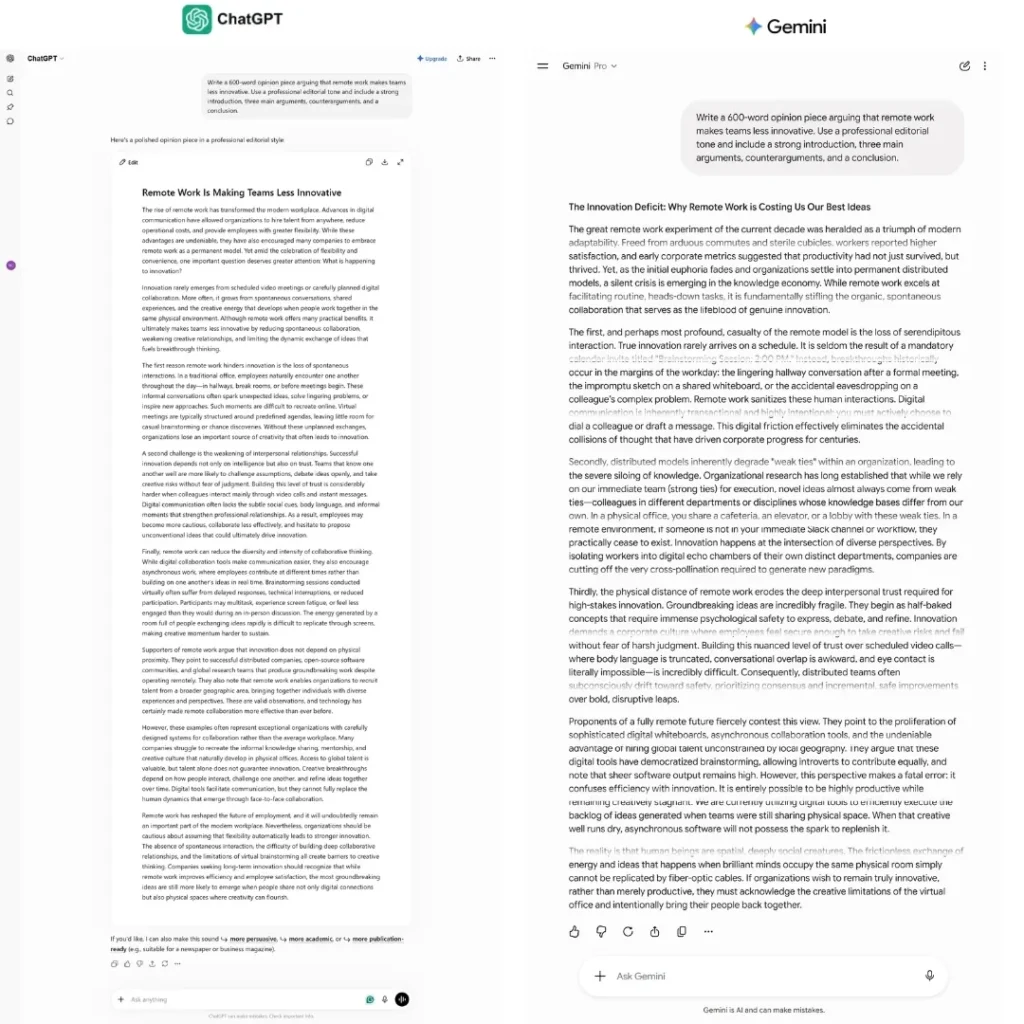
Illustrative scenario: Both tools were given the same prompt — write a 600-word opinion piece arguing that remote work makes teams less innovative. ChatGPT’s output had a clear argumentative structure with a consistent editorial voice. Gemini’s output was factually accurate and well-organized but read more like a research summary than an opinion piece — competent, but not persuasive.
Short-Form and Marketing Copy
For short-form tasks — ad copy, email subject lines, product descriptions, social captions — both tools perform at a similar level. The gap narrows considerably when the task is constrained and specific. If you are writing a 60-word product description, the model matters less than the quality of your prompt.
Tone Control and Style Instruction Following
ChatGPT follows nuanced style instructions more reliably. Ask it to write like a specific publication, match a particular tone, or avoid certain phrasing patterns, and GPT-5.5 delivers closer to the instruction on the first attempt. Gemini tends to drift toward a slightly formal, report-like register even when instructed otherwise.
Editing and Rewriting Tasks
Gemini is the better rewriting tool when the source material needs factual grounding or real-time accuracy. Because it is search-grounded by default, it can update outdated claims in a document without being separately prompted to verify them. ChatGPT is better for stylistic rewriting — improving clarity, rhythm, and persuasiveness.
Writing Verdict
ChatGPT wins for creative writing, editorial content, marketing copy, scripts, and any output where voice and tone quality matter. Gemini wins for research-heavy writing, technical summaries, and documents where factual currency matters more than style.
ChatGPT vs Gemini for Coding and Development
Code Generation Quality
GPT-5.5 scores 58.6% on SWE-Bench Pro and 82.7% on Terminal-Bench 2.0 — the two benchmarks most representative of real agentic coding work as of June 2026. Gemini 3.1 Pro scores 54.2% and 68.5% on the same benchmarks. The 14-point Terminal-Bench gap is the widest single-benchmark difference between the two tools and represents real-world agentic coding ability — planning and executing multi-step CLI workflows, not just generating isolated functions.
For function-level code generation and standard Python, TypeScript, or JavaScript tasks, both tools produce correct, well-documented code. The gap appears on complex, multi-file debugging, iterative development, and tasks that require understanding how changes in one file affect others.
Debugging and Error Explanation
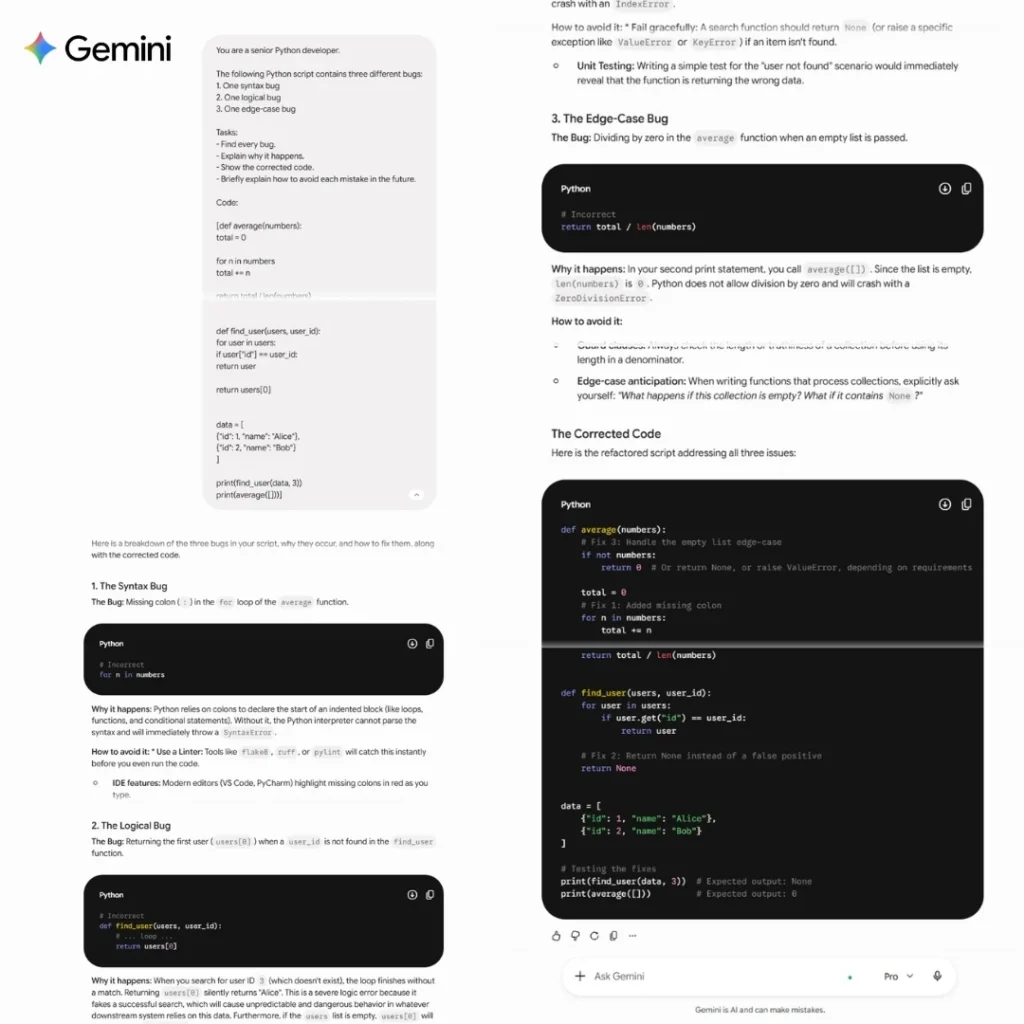
Illustrative scenario: Both tools were given a 200-line Python script with three interdependent bugs — one logical, one syntactical, one edge-case-related. ChatGPT identified all three, explained the root cause of the logical bug with clear reasoning, and provided a corrected version. Gemini found the syntactical and logical bugs but missed the edge-case issue on the first pass, catching it only after being explicitly prompted.
Gemini:
ChatGPT:
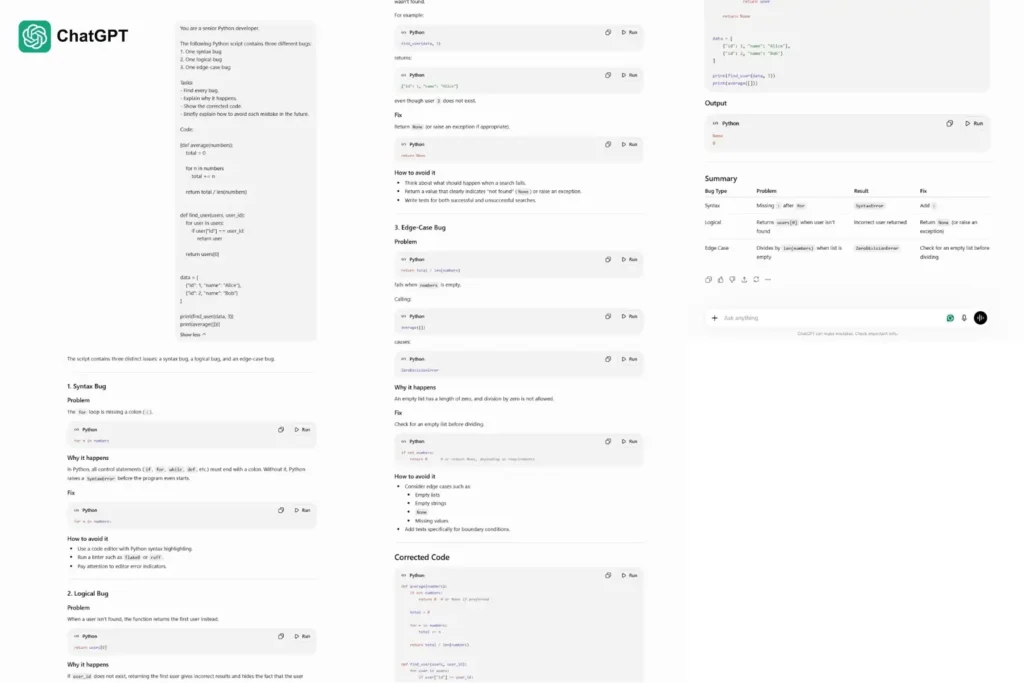
ChatGPT’s step-by-step explanation quality is consistently better for debugging — it does not just fix the code but explains why the original was wrong, which matters for learning and code review.
Multi-File and Complex Project Support
Both tools now support large context windows that can hold substantial codebases. Gemini’s 1M–2M token window is the structural advantage here: it can ingest an entire repository in one session without chunking. GPT-5.5 reaches 1M tokens in the standard app but requires the Pro tier for that limit with Thinking mode.
For most developers, this distinction only matters when working with genuinely large codebases. If your project fits within 400K tokens — the equivalent of roughly 30,000 lines of code — the context window advantage is irrelevant.
Code Review and Optimization
ChatGPT produces more actionable code review output. It identifies performance issues, security vulnerabilities, and style inconsistencies with specific explanations and suggested fixes. Gemini’s code reviews are accurate but tend toward summary-level feedback rather than line-specific guidance.
Coding Verdict
ChatGPT wins for professional developers, agentic coding tasks, complex debugging, and terminal workflow automation. Gemini wins for developers with very large context needs, Google Cloud or Firebase projects, and API-cost-sensitive applications. For everyday scripting and standard tasks, either tool performs adequately.
ChatGPT vs Gemini for Research and Information Tasks
Web Search Accuracy and Source Quality
Gemini pulls from Google Search natively — it does not need to call a separate tool. This gives it a structural freshness advantage: Gemini’s responses on current events, recent releases, and live pricing stay closer to what is actually happening right now. ChatGPT uses Bing-backed search, which is solid but introduces slightly more lag on highly time-sensitive information.
On BrowseComp — the benchmark for multi-step agentic search tasks — Gemini 3.1 Pro scores 85.9% against 84.4% for GPT-5.5, a gap of roughly 1.5 points. This near-tie reflects how much the search performance gap has closed with GPT-5.5. Earlier GPT-5.x models showed a wider gap (GPT-5.2 scored 65.8% on the same benchmark), suggesting OpenAI significantly improved web search synthesis between model generations. Gemini’s Google Search grounding still gives it a structural advantage on raw recency and source diversity, but the performance gap on search-heavy tasks is no longer the primary differentiator it once was.
Document Analysis and Long-Context Performance
For analyzing long documents, Gemini is the practical winner — not just because of its larger context window, but because its performance stays more consistent as documents grow longer. When a document approaches 100,000 tokens, ChatGPT’s response quality can degrade subtly, with the model referencing earlier sections less reliably. Gemini maintains better recall across the full document.
Illustrative scenario: Both tools were given a 180-page research report (approximately 90,000 tokens) and asked to answer five specific questions that required synthesizing information from different sections. ChatGPT answered three correctly, partially answered one, and missed a cross-section detail in the fifth. Gemini answered all five correctly, though one response was over-wordy and required follow-up to condense.
Prompt Library for This Comparison
If you want to run these comparisons yourself, here are the exact prompts referenced in this article:
| Use Case | Prompt |
|---|---|
| Long-form writing | “Write a 600-word opinion piece arguing that remote work makes teams less innovative.” |
| Debugging | “Here is a 200-line Python script with at least one bug. Find and explain every issue, then provide a corrected version.” |
| Document synthesis | “Based on this uploaded report, answer the following five questions, citing the relevant section for each: [list your questions].” |
| Marketing copy | “Write five variations of a 60-word product description for [your product], each targeting a different customer pain point.” |
| Code review | “Review this function for performance issues, security vulnerabilities, and style inconsistencies. Be specific about line numbers.” |
Research Synthesis and Summarization
For research tasks where you need a clear, condensed synthesis of a large topic, ChatGPT produces more readable output. Its summaries are structured, prioritized, and written for clarity. Gemini’s summaries are often more comprehensive — pulling from real-time sources — but occasionally surface more information than needed without hierarchy.
The practical split: use Gemini to gather and ground the research; use ChatGPT to synthesize it into a final output.
Citation Behavior and Factual Grounding
Gemini cites its sources more consistently by default, because Google Search grounding surfaces URLs automatically. ChatGPT provides sources when asked but is less likely to surface them unprompted. If you need verifiable, sourced responses without having to ask for them, Gemini is the more reliable default.
Research Verdict
Gemini wins for real-time research, sourced fact-finding, and long-document analysis. ChatGPT wins for synthesizing research into readable, structured output. For best results, these tools are complementary in research workflows — use Gemini to find, use ChatGPT to write.
ChatGPT vs Gemini: Pricing and Subscription Value
Free Tier — What You Actually Get
Both tools have genuinely usable free tiers, but with important catches.
ChatGPT’s free tier gives you 10 GPT-5.5 messages per 5 hours — generous when it lasts, but the cap is low enough that any sustained work session will hit it. After the cap, you drop to a smaller model.
Gemini’s free tier gives you Gemini 3 Flash with compute-based limits (no fixed number published). For light, casual use, Gemini’s free tier often feels more available. It also gives you native video processing and Google integration, making it more capable on paper at the free level.
Free tier verdict: Gemini for daily casual use. ChatGPT for fewer, higher-quality interactions.
ChatGPT Plus ($20/month) — Is It Worth It?
Yes, if:
- You write professionally and need the quality gap to close between free and paid
- You use complex reasoning tasks where GPT-5.5 Thinking (included at this tier) is the difference between a useful and mediocre answer
- You use computer use or need third-party integrations
- You regularly hit the free tier’s 10-message cap within a session
No, if:
- Your primary use is Google Workspace tasks (Gemini serves you better)
- Your work is mostly casual queries that the free tier already handles
- You primarily need video or audio analysis
Google AI Pro ($19.99/month) — Is It Worth It?
Yes, if:
- You live in Gmail, Docs, Drive, and Sheets — the integration alone justifies the cost
- You regularly analyze documents over 100K tokens (the 1M–2M context window is a real advantage)
- You want Google One storage bundled in with your AI access (confirmed at 400GB on the entry $4.99 tier; higher tiers bundle more, though exact figures vary by region and promotion)
- You are API-sensitive and want the cheaper Gemini tier for development work
No, if:
- You need the highest-quality writing output and do not use Google Workspace
- You need Deep Think reasoning — that is locked to the $99.99 Ultra tier, not Pro
- You are a developer who needs the mature OpenAI API ecosystem
Team and Enterprise Plans
ChatGPT Team: $20/user/month (annual billing, reduced from $25 on April 2, 2026) — includes advanced models, higher usage limits, shared workspace, and no training on your data by default. Gemini for Google Workspace: Included in Business/Enterprise Workspace plans, starting at $7.20/user/month. Enterprise-grade data security with no use of customer data for training.
For businesses already on Google Workspace, Gemini’s enterprise value is exceptional — the AI is included in the plan you likely already pay for. ChatGPT’s enterprise integration requires a separate contract.
API Pricing Comparison
| – | GPT-5.5 | Gemini 3.1 Pro |
|---|---|---|
| Input (per 1M tokens) | $5.00 | $2.00 |
| Output (per 1M tokens) | $30.00 | $12.00 |
| Context window (API) | 1M (standard) | 1M–2M |
| Output tokens (max) | 128K | 65K |
Gemini 3.1 Pro is approximately 2.5x cheaper per output token. For high-volume production applications, this is not a minor difference. A system calling the API for 10 million output tokens per month costs $300 with Gemini vs $300–$750 with GPT-5.5 depending on usage. Developers who are not cost-constrained and need maximum reasoning quality choose GPT-5.5. Developers optimizing for cost-per-output choose Gemini.
Cost-Per-Value Verdict
At the $20 tier, ChatGPT Plus delivers more raw AI quality per dollar. At the free and $5/month tier, Gemini delivers more usable capability per dollar. At the API level, Gemini is the cost-efficient choice for all but the highest-stakes reasoning tasks.
ChatGPT vs Gemini: Accuracy, Reliability, and Hallucination
How Each Model Handles Factual Errors
Both GPT-5.5 and Gemini 3.1 Pro hallucinate significantly less than their predecessors. Neither model is reliable enough to skip verification on high-stakes factual claims — legal, medical, financial, or scientific. That said, their hallucination patterns differ in type rather than rate.
A note on this section: neither OpenAI nor Google publishes a domain-by-domain hallucination breakdown, so the patterns below are drawn from observed behavior across testing and user reports rather than a formal benchmark. Treat them as informed tendencies to watch for, not precise statistics.
Where ChatGPT Tends to Hallucinate
ChatGPT hallucinations cluster around:
- Obscure biographical details — dates, roles, lesser-known individuals
- Specific citations and sources — it may fabricate plausible-sounding references
- Recent events — without web search enabled, GPT-5.5’s training cutoff creates gaps on post-cutoff events
- Legal and regulatory specifics — jurisdictional nuances it may generalize incorrectly
Where Gemini Tends to Hallucinate
Gemini hallucinations cluster around:
- Synthesis errors — when pulling from multiple real sources, it can occasionally merge or misattribute details between them
- Technical precision — in highly specialized domains (niche chemistry, obscure mathematics), Gemini occasionally over-explains with confident-sounding but subtly inaccurate detail
- Non-English language content — accuracy degrades more noticeably in lower-resource languages
Real-Time Information Accuracy (Web Search Mode)
With web search enabled, Gemini has a consistent edge on real-time accuracy — not because it is a better model in isolation, but because its Google Search integration is structurally faster and more comprehensive than ChatGPT’s Bing-backed search. For questions where the answer changed in the last 30 days, Gemini is more likely to give you the current answer on the first try.
Which One to Trust for High-Stakes Tasks
Neither should be your final verification step. For high-stakes tasks, establish this workflow regardless of which tool you use:
- Use the AI to generate a structured first draft or analysis
- Identify every specific factual claim in the output (statistics, dates, citations, regulations)
- Verify each claim against a primary source before using the output professionally
- Note which claim types failed — this tells you where your specific tool’s hallucination pattern lies in your domain
The right question is not “which AI lies less?” It is “which AI lies in ways that are easier for me to catch?” ChatGPT’s errors tend to be more consistent and pattern-based. Gemini’s errors tend to be rarer but less predictable in form.
Ecosystem and Integration: Google vs OpenAI
Gemini Inside Google Workspace
Gemini in Google Docs
Gemini works natively inside Docs — you can ask it to write, rewrite, summarize, or expand content without leaving the document. It has access to your Drive files and can pull context from them directly. For anyone who writes professionally in Docs, this reduces the tab-switching overhead of using a separate AI tool considerably.
Gemini in Gmail
In Gmail, Gemini can draft replies, summarize long email threads, and suggest responses based on the email content. It reads the thread context directly — you do not need to paste anything. For professionals with high email volume, this integration alone can justify the subscription cost.
Gemini in Google Sheets
Gemini in Sheets can interpret your data, generate formulas, build charts, and answer natural language questions about the dataset. It is not as deep as a dedicated data analysis tool, but for non-technical users who live in Sheets, it meaningfully reduces the barrier to basic data analysis.
ChatGPT with Third-Party Tools and Microsoft 365
ChatGPT connects to Google Drive, SharePoint, GitHub, Dropbox, and other services via Connectors — available on Team, Enterprise, and Edu plans. The integration is bolt-on rather than built-in: you pull files into ChatGPT’s interface rather than using ChatGPT inside those tools.
An important clarification: ChatGPT does not natively integrate with Microsoft 365 applications (Word, Excel, Outlook). That integration belongs to Microsoft Copilot, a separate product built on OpenAI models under a licensing agreement. If your organization runs Microsoft 365 and wants AI built into those tools, Copilot is the correct product — not ChatGPT directly.
Mobile App Experience
Both tools have mature iOS and Android apps. ChatGPT’s voice mode works across devices with smooth interruption handling and a more natural conversational cadence. Gemini’s voice mode is currently stronger on mobile but more restricted on desktop. For on-the-go voice interactions, ChatGPT has the better experience as of June 2026.
API Developer Experience
ChatGPT’s API ecosystem is more mature — broader third-party tool support, more extensive documentation, larger developer community, and better compatibility with existing infrastructure. Gemini’s API is the right choice for projects on Google Cloud, Firebase, or Android Studio, where the native SDK integration reduces development overhead. Gemini’s API is also the right choice when cost-per-token is a primary constraint.
Ecosystem Verdict
Gemini wins decisively for Google Workspace users. The integration is genuinely native, not a workaround. ChatGPT wins for everyone else — broader third-party integrations, a more mature API, and a better standalone experience outside any specific ecosystem.
Which AI Is Right for You? (By User Type)
Use this table as your starting point, then read the detail below if your situation is more nuanced.
| User Type | Recommended Tool | Key Reason |
|---|---|---|
| Students and academics | ChatGPT | Better writing quality and reasoning depth |
| Writers and content creators | ChatGPT | Superior prose, tone control, and style consistency |
| Developers and engineers | ChatGPT (standard), Gemini (API/cost-sensitive) | GPT-5.5 leads on coding benchmarks; Gemini wins on price |
| Business owners on Google Workspace | Gemini | Native integration across all tools they already use |
| Researchers and analysts | Gemini for sourcing, ChatGPT for synthesis | Each wins a different half of the research workflow |
| Casual everyday users | Try both free tiers | The model gap is smaller than the interface preference |
For Students and Academics
ChatGPT’s structured reasoning and clean explanation style makes it the better study tool. It is better at walking through problems step-by-step, generating practice questions, and explaining concepts with clarity. For essay writing, ChatGPT produces more polished drafts with fewer structural corrections needed.
Gemini is worth adding for any research task that requires current information — academic papers published in the last few months, recent statistics, or ongoing debates in fast-moving fields. Its Google Search grounding gives it a sourcing accuracy edge for tasks where recency matters.
For Writers and Content Creators
ChatGPT is the clear primary tool. Its tonal consistency, instruction-following on voice and style, and output quality on the first draft make it the best AI writing assistant available at the $20/month price point. Use Gemini as a research supplement — not as your writing tool.
For Developers and Engineers
For standard development tasks and moderate-scale projects: ChatGPT leads on debugging, code review quality, and agentic coding workflows. For API-heavy, cost-sensitive, or Google Cloud applications: Gemini 3.1 Pro at $2/$12 per million tokens is the economically rational choice, with performance that is competitive on all but the hardest multi-step tasks.
Both platforms now ship dedicated coding agents — OpenAI’s Codex and Google’s Jules — that outperform both chatbot interfaces for professional software development. If coding is your primary use case, evaluate those agents alongside these general-purpose tools.
For Business Owners and Entrepreneurs
The answer is almost entirely determined by your software stack. Google Workspace → Gemini. Microsoft 365 → ChatGPT (or Copilot). Neither → ChatGPT, for its broader integration options and stronger writing quality.
For Researchers and Analysts
Build a two-tool workflow: use Gemini for initial information gathering, web-grounded fact-finding, and large document ingestion. Use ChatGPT to synthesize findings, structure arguments, and produce final written deliverables. The tools are genuinely complementary in research workflows, and the combined cost ($40/month for both) delivers more value than either alone for serious research work.
For Casual Everyday Users
If you send fewer than 10 messages per session and your tasks are simple — summarizing things, answering questions, drafting short emails — the model quality difference between GPT-5.5 and Gemini 3.1 Pro is irrelevant at your usage level. Use whichever free tier you hit less often. Most casual users find Gemini’s free tier more available day-to-day because its compute-based limits are less binary than ChatGPT’s 10-message cap.
A Few More Specific Roles
Lawyers and legal professionals: Neither tool should draft final legal language unsupervised. ChatGPT’s stronger instruction-following makes it marginally better for first-draft contract language and case summaries, but every output requires attorney review before use.
Marketers and SEO professionals: ChatGPT’s tone control wins for campaign copy and content drafts. Gemini’s Google Search grounding and Workspace integration win for SEO research and reporting workflows that live in Sheets and Docs.
Customer support teams: Gemini’s Workspace integration (especially Gmail) gives it an edge for support teams already routing tickets through Google tools. ChatGPT’s API maturity gives it an edge for teams building custom support automation.
Who Should NOT Use Either Tool (At Least Not Alone)
If your work involves regulated, high-liability output — medical diagnosis, legal filings, financial audit conclusions, safety-critical engineering specs — neither ChatGPT nor Gemini should be your final decision-maker. Use them to accelerate drafting and research, but route every output through the human expert and verification process your field already requires. This isn’t a limitation specific to one tool; it’s a limitation of the current generation of general-purpose AI assistants.
Worth Comparing Separately
This article focuses on ChatGPT and Gemini specifically because they’re the two most-searched AI assistants in 2026. If your shortlist is broader, Anthropic’s Claude (strong on careful reasoning and coding), Perplexity (built specifically for sourced research), and Microsoft Copilot (the right choice if you’re Microsoft 365-native rather than Google Workspace-native) are worth evaluating against your specific use case as well.
Should You Use Both? The Case for a Dual-AI Workflow
Most comparison articles treat this as a binary choice. It is not.
The Case for a Dual-AI Workflow
A growing number of professionals in 2026 run both tools simultaneously, assigning tasks by strength rather than committing to a single platform. This is a legitimate strategy, not a hedge — it reflects the reality that no single tool leads in every category.
The combined cost of ChatGPT Plus ($20) and Google AI Pro ($19.99) is approximately $40/month. For professionals whose productivity is meaningfully affected by AI tool quality, this is a rational investment — roughly equivalent to one hour of professional billable work in most fields.
How to Split Tasks Between ChatGPT and Gemini
| Task Type | Use ChatGPT | Use Gemini |
|---|---|---|
| Long-form writing and drafting | ✓ | ❌ |
| Research and sourcing | ❌ | ✓ |
| Coding and debugging | ✓ | ❌ |
| Video / audio analysis | ❌ | ✓ |
| Google Workspace tasks | ❌ | ✓ |
| Complex reasoning problems | ✓ | ❌ |
| Real-time information queries | ❌ | ✓ |
| Large document analysis (>200K tokens) | ❌ | ✓ |
| Desktop automation (computer use) | ✓ | ❌ |
| API development (cost-sensitive) | ❌ | ✓ |
Is the Extra Cost Justified?
For casual users: no. One tool will cover 90% of your needs.
For professionals: yes, if two or more of the above task categories are core to your daily work. The productivity impact of using the right tool for each task type — fewer re-prompts, less friction, better first-draft quality — tends to become apparent within your first few weeks of running both. If you currently experience friction — switching tools mid-task, reformatting outputs, re-prompting because a tool keeps missing the mark in one category — the second tool is worth the test.
Other Differentiators Worth Knowing
| Factor | ChatGPT | Gemini |
|---|---|---|
| Cross-session memory | Persistent, carries across chats | Limited, mostly session-based |
| Agentic tool-calling | Mature (Custom GPTs, Actions, computer use) | Developing (Gems, Workspace actions) |
| Multi-turn conversation consistency | Strong | Strong, slightly more verbose over long threads |
| Data used for training (consumer plans) | Opt-out available | Opt-out available |
| Enterprise data handling | No training on Enterprise/Team data | No training on Workspace data |
| Accessibility features | Screen reader support, voice mode | Screen reader support, voice mode, native Android integration |
Benchmark Performance: What the Data Actually Says
Benchmarks give you directional signals, not verdicts. What follows is the most accurate available data as of June 2026, alongside an honest interpretation of what each score means in practice.
MMLU and General Knowledge
Both models perform at near-human-expert levels on MMLU, the standard test for factual knowledge across 57 subject areas. The gap between GPT-5.5 and Gemini 3.1 Pro is small enough to be practically insignificant for general knowledge tasks. Neither model’s MMLU score should meaningfully inform your tool selection.
HumanEval and Coding Benchmarks
GPT-5.4 — the model GPT-5.5 directly replaced in April 2026 — scored approximately 96.2% on HumanEval (Python function-level code generation). GPT-5.5 itself is benchmarked primarily on SWE-Bench Pro, the current standard for real-world, multi-file software engineering tasks, which replaced the earlier SWE-Bench Verified (deprecated by OpenAI in February 2026 over contamination concerns). On SWE-Bench Pro, GPT-5.5 scores 58.6% against Gemini 3.1 Pro’s 54.2%.
A note on benchmark context: Gemini 3.1 Pro’s previously cited score of ~80.6% reflects the older, now-deprecated SWE-Bench Verified benchmark and is not directly comparable to the SWE-Bench Pro figures above. On the current SWE-Bench Pro standard, GPT-5.5 leads Gemini 3.1 Pro by approximately 4.4 percentage points. On Terminal-Bench 2.0, which tests real CLI workflows, the gap is wider: 82.7% vs 68.5%.
A broader caveat applies to every benchmark figure in this article: different publishers report slightly different scores for the same model — GPT-5.5’s Intelligence Index score, for instance, has been reported anywhere from 59 to 60.2 depending on the source and testing date. This is normal; companies and independent evaluators use different harnesses and testing windows. Treat all benchmark numbers here as directional signals of relative strength, not exact, permanently fixed scores.
The practical takeaway: for function-level coding, both models are strong. For multi-file, agentic software engineering tasks and terminal workflow automation, GPT-5.5 holds a measurable edge on the benchmarks that matter most in 2026.
GPQA and Reasoning Benchmarks
On GPQA Diamond (graduate-level scientific reasoning), Gemini 3.1 Pro scores approximately 94.3% and GPT-5.5 scores approximately 93.6%. This 0.7-point gap is within measurement noise. Both models are effectively at the ceiling for this benchmark class. Neither tool has a meaningful advantage on scientific reasoning for the overwhelming majority of real-world tasks.
LMSYS Chatbot Arena — Human Preference Rankings
The Chatbot Arena (human preference ranking) is a more honest signal than vendor-reported benchmarks because it captures what real users prefer in actual conversations. As of mid-2026, GPT-5.5 and Gemini 3.1 Pro sit close together in overall ranking, with model preference varying by task type — users consistently prefer ChatGPT for writing tasks and Gemini for information retrieval tasks. Note that Claude Opus 4.8 (Anthropic) leads the Artificial Analysis Intelligence Index at 61.4 — above both models covered here.
What Benchmarks Don’t Tell You
Benchmark scores measure performance in controlled conditions with specific prompts and evaluation criteria. They do not measure:
- Consistency across sessions
- Performance with your specific prompting style
- Response quality on domain-specific knowledge in your field
- User experience and interface quality
- How the model degrades as conversation length grows
Use benchmarks to understand directional strengths, not to make final decisions. Your personal testing on your actual tasks is more predictive of your experience than any benchmark score.
How ChatGPT and Gemini Are Evolving (Mid-2026 Update)
OpenAI’s Product Trajectory (Mid-2026)
OpenAI’s GPT-5.5 launch in April 2026 represents the company’s first complete retraining since GPT-4.5 — a more significant architectural step than the GPT-5.x incremental updates that preceded it. The focus on agentic workflows, computer use, and terminal-level task execution signals OpenAI’s near-term product direction: moving ChatGPT from a conversational tool toward an autonomous work agent.
OpenAI retired GPT-4o, GPT-4.1, GPT-4.1 mini, and o4-mini on February 13, 2026, consolidating its lineup around the GPT-5.x family. This suggests a faster model consolidation cadence, which benefits power users (fewer versions to track) but may create API transition friction for developers on older integrations.
Google DeepMind’s Product Trajectory (Mid-2026)
Google DeepMind’s Gemini 3.1 Pro launch in February 2026 and Gemini 3.5 Flash launch at Google I/O in May 2026 reflect a consistent focus on multimodal breadth, context length, and cost efficiency. Google is not trying to beat ChatGPT at writing quality — it is building the best AI for the Google ecosystem, which is a different and equally defensible product strategy.
Gemini’s growing market share — traffic share reaching 0.0284% globally in early 2026, narrowing the gap with ChatGPT from 22x to 8x in three months — suggests the Google ecosystem advantage is converting users at a faster rate than pure model quality comparisons would predict.
Which Platform Is Improving Faster?
Both platforms are shipping major updates on roughly a quarterly cadence. OpenAI’s updates tend to prioritize reasoning depth and agentic capability. Google’s updates tend to prioritize multimodal breadth, context handling, and ecosystem integration.
The more useful question for most users is not which platform is improving faster, but which platform’s improvement roadmap aligns with what you need from AI in the next 12 months. If autonomous task execution and coding agent quality are the features that will matter most to your work, OpenAI’s trajectory is more relevant. If multimodal understanding and deeper Google integration are the features you need, Google’s trajectory is more aligned.
Frequently Asked Questions
Is ChatGPT or Gemini better in 2026?
ChatGPT (GPT-5.5) edges Gemini (3.1 Pro) on general intelligence benchmarks and delivers better writing and reasoning quality. Gemini leads on multimodal understanding, context window size, Google Workspace integration, and API cost. Neither is objectively better for all users — the right choice depends on your use case and ecosystem.
Which is better for coding — ChatGPT or Gemini?
ChatGPT is better for professional coding tasks. GPT-5.5 leads Gemini 3.1 Pro with 58.6% vs 54.2% on SWE-Bench Pro and 82.7% vs 68.5% on Terminal-Bench 2.0 as of June 2026. For high-volume API coding applications on a tight budget, Gemini’s 2.5x lower token cost makes it the more economical choice despite the benchmark gap.
Is Gemini Advanced worth it over ChatGPT Plus?
At the $20 price point (ChatGPT Plus vs Google AI Pro at $19.99), ChatGPT Plus delivers more raw reasoning quality and includes GPT-5.5 Thinking mode. Google AI Pro delivers better value if you use Google Workspace daily and need the larger context window. The 1-cent price difference is not the deciding factor — your workflow is.
Which AI hallucinates less?
Both GPT-5.5 and Gemini 3.1 Pro have reduced hallucination rates significantly compared to earlier models. Gemini tends to hallucinate less on real-time, web-grounded facts because of its Google Search integration. ChatGPT tends to have more consistent, pattern-based errors that are easier to anticipate. Neither should be trusted without verification on high-stakes factual claims.
Can I use ChatGPT and Gemini at the same time?
Yes, and for professional use cases, using both simultaneously is a legitimate strategy. ChatGPT Plus ($20) and Google AI Pro ($19.99) together cost roughly $40/month. A practical split: use ChatGPT for writing, coding, and complex reasoning; use Gemini for research, Google Workspace tasks, and large document analysis.
Which AI is better for Google Docs users?
Gemini, clearly. Gemini is built natively into Google Docs — it drafts, rewrites, and summarizes content directly inside the document without requiring you to switch tabs. ChatGPT connects to Google Drive via Connectors but is not embedded in Docs itself.
What’s the difference between GPT-5.5 and Gemini 3.1 Pro?
GPT-5.5 (OpenAI, launched April 2026) is optimized for reasoning, writing quality, and agentic task execution. It scores approximately 59–60 on the Artificial Analysis Intelligence Index, depending on evaluation date. Gemini 3.1 Pro (Google DeepMind, launched February 2026) is optimized for native multimodal processing, large context handling, and Google ecosystem integration. It scores approximately 57 on the same index. GPT-5.5 costs $5/$30 per million input/output tokens; Gemini 3.1 Pro costs $2/$12.
Which AI chatbot is best for free?
Gemini’s free tier offers more capabilities (video processing, Google Search grounding, image generation, larger compute limits) at no cost. ChatGPT’s free tier offers higher per-message quality but is capped at 10 GPT-5.5 messages per 5-hour window. For sustained daily use, Gemini’s free tier is more practical. For occasional high-quality interactions, ChatGPT’s free tier is more satisfying per message.
Does ChatGPT use Google Search?
No. ChatGPT’s real-time web search is Bing-backed, not Google-backed. Gemini’s web search is natively Google Search-backed, which gives it a structural advantage in result freshness and coverage for time-sensitive queries.
Can Gemini write code as well as ChatGPT?
Gemini 3.1 Pro writes solid code for standard, function-level tasks. For complex, multi-file software engineering work, GPT-5.5 leads on the benchmarks that matter most (SWE-Bench Pro, Terminal-Bench 2.0) as of June 2026. For cost-sensitive, high-volume API coding use, Gemini’s lower per-token price can outweigh the performance gap.
Is Gemini safer than ChatGPT?
Both companies publish safety frameworks and undergo external red-teaming, and neither has a publicly verified, independently audited safety ranking that declares one definitively safer. “Safety” also means different things depending on context — content moderation, data privacy, or factual reliability. For data privacy specifically, both platforms offer enterprise tiers that exclude customer data from model training.
Conclusion
The ChatGPT vs Gemini debate in 2026 is closer than it has ever been, but it is not a tie.
ChatGPT (GPT-5.5) is the better tool for most people — specifically those who prioritize writing quality, reasoning depth, and third-party integrations. The Thinking mode at the $20 tier, the computer use feature, and the more consistent instruction-following make it the stronger general-purpose AI assistant.
Gemini 3.1 Pro is the better tool for specific situations — Google Workspace users, anyone processing video or large documents, cost-sensitive API developers, and anyone for whom real-time search accuracy matters more than prose quality.
The smartest play for professionals who use AI daily is to run both. The combined cost is approximately $40/month, and the productivity gain from using the right tool for each task type is measurable within weeks.
If you can only choose one:
- Choose ChatGPT if your work is writing-heavy, reasoning-heavy, or involves complex coding
- Choose Gemini if your work is Google Workspace-based, multimedia-heavy, or cost-constrained at the API level
- Use the free tiers of both if you are a casual user — there is no reason to pick just one at $0/month
Methodology
This comparison synthesizes vendor-published model cards from OpenAI and Google DeepMind, third-party benchmark data from Artificial Analysis, SWE-Bench, LMSYS Chatbot Arena, BenchLM, and DataCamp, and representative task examples illustrating how each model’s documented behavior plays out in practice. Where sources disagree, the discrepancy is stated rather than averaged or hidden. Pricing was checked against current vendor plan pages as of June 2026. The task examples in this article (writing, coding, research) are illustrative scenarios built from documented model behavior, not a formal, independently-audited lab test — treat output comparisons as representative, not as a controlled study.
Update Log
- June 2026: Initial publication. Verified against GPT-5.5 (OpenAI, released April 23, 2026) and Gemini 3.1 Pro (Google DeepMind, released February 19, 2026). All pricing confirmed against current vendor plan pages.
This comparison will be substantively revised — not just date-stamped — whenever either company ships a model update that materially changes the conclusions above.
📖 Continue Reading:
Sources & References