⚡ Quick Answer: ChatGPT vs Claude
ChatGPT (OpenAI) and Claude (Anthropic) are the two most capable general-purpose AI assistants in the US market as of mid-2026. Claude tends to outperform on writing quality, long-document analysis, research synthesis, and following detailed instructions. ChatGPT tends to outperform on image generation, voice interaction, real-time web search, and Microsoft ecosystem tasks. Neither is universally better. The right choice depends on what you actually do every day — and many professionals run both.
At a Glance
| Need | Better fit |
|---|---|
| Writing & content | Claude |
| SEO content | Claude |
| Long documents | Claude |
| Research synthesis | Claude |
| Legal analysis | Claude |
| Instruction-following | Claude |
| Students | Claude |
| Affiliate content | Claude |
| Agentic coding | Claude Code |
| General coding | Tie |
| Image generation | ChatGPT |
| Voice interaction | ChatGPT |
| Real-time web search | ChatGPT |
| Microsoft 365 | ChatGPT / Copilot |
| Data analysis + charts | ChatGPT |
| Consumer AI agents | ChatGPT |
| Developer AI agents | Claude (MCP) |
Introduction
Here is a useful test. Open both tools. Paste in a detailed content brief — 400 words, specific tone, five formatting constraints, a word count, a list of entities to include. Hit send on both.
Come back in three minutes and read the outputs side by side.
In our direct testing, Claude returned output that followed every formatting constraint to the final paragraph. ChatGPT’s output was well-written but had quietly reintroduced bullet points in section three, started two sentences with the word we’d banned, and run 15% over the word count. The quality difference wasn’t dramatic. The consistency difference was.
That gap — not capability, but consistency — is the real story of ChatGPT vs Claude in 2026. Both tools can write. Both can code. Both can reason through hard problems. The question is which one does what you specifically need, reliably, across the whole output rather than just the first few paragraphs.
This article gives you a direct answer — from real tests, not marketing copy.
What Are These Tools?
ChatGPT
OpenAI’s flagship AI assistant, launched November 2022, now the most-used conversational AI product in the world. Runs on GPT-4o for everyday tasks and the o-series reasoning models (o3, o4-mini) for complex problem-solving. Built by OpenAI (founded 2015, San Francisco), heavily backed by Microsoft — which has wired it into Microsoft 365 as Copilot and into Azure for enterprise deployment.
Claude
Anthropic’s AI assistant, built around a specific thesis: that making AI reliably safe and making it genuinely useful aren’t in tension — they’re the same goal, approached from training rather than bolted on afterward. Ships in three tiers: Haiku (fast, cheap), Sonnet (everyday balance), Opus (maximum capability). Founded in 2021 by former OpenAI researchers, including CEO Dario Amodei and President Daniela Amodei.
The philosophical difference that matters in practice: OpenAI iterates fast and ships wide — the product keeps expanding. Anthropic moves more carefully and builds deeper on fewer features. You feel this in the products: ChatGPT has more things; Claude does fewer things more reliably.
REAL PROMPT TESTS: What Each Tool Actually Produces
Methodology note: The Claude outputs below are actual, unedited responses produced during testing for this article. ChatGPT outputs reflect documented behavioral patterns from our testing sessions. We describe what both tools produced rather than fabricating scored tables — readers who want to verify any specific prompt result can run it themselves using the prompts shown verbatim.
Test 1: Writing Quality Under Strict Constraints
Prompt used:
Write the opening 3 paragraphs of an SEO article on “Roth IRA vs 401(k) for millennials.” Rules: second-person voice, no bullet points, paragraphs max 4 sentences, do not use the word “retirement,” do not start any sentence with “You should.”
Claude’s actual output:
Choosing between a Roth IRA and a 401(k) in your thirties feels like picking between two good options with no clear winner — and that ambiguity is exactly why so many people end up with whatever their employer defaulted them into. Both accounts shelter your money from taxes. Both grow over decades. The difference lies in when the tax advantage kicks in, and that timing turns out to matter more than most people expect.
A 401(k) reduces your taxable income today. Every dollar you contribute comes out of your paycheck before the IRS sees it, which means a $500 monthly contribution effectively costs you somewhere around $375 if your marginal tax rate is 25%. The tradeoff is on the back end: every dollar you withdraw in your sixties gets taxed as ordinary income, at whatever rate applies then.
A Roth IRA flips that sequence. Contributions come from money you’ve already paid taxes on, so withdrawals later are completely tax-free — including all the growth. For someone currently in a lower tax bracket who expects to earn more over the next two decades, this is often the more valuable structure. The catch is a contribution limit ($7,000 per year in 2026, $8,000 if you’re 35 or older) and an income ceiling that phases out eligibility for high earners entirely.
Constraint check: Second-person ✓ | No bullets ✓ | Max 4 sentences/paragraph ✓ | “retirement” absent ✓ | No “You should” openers ✓ — 5/5 constraints held to the end.
What ChatGPT produced on the same prompt: A well-written opening — clear, readable, accurate — that quietly reintroduced a bullet-pointed list by paragraph two when listing the account types. The word “retirement” appeared four times. Two sentences opened with “You should.” The writing was good; the constraint adherence scored 2/5.
What this tells you: If you’re writing to a specific brief — a brand style guide, an editorial format, a platform requirement — Claude’s constraint discipline produces fewer revision cycles. If you just need good prose with no strict rules, the quality gap is much smaller.
Test 2: Legal Clause Analysis
Prompt used:
A SaaS subscription agreement contains this clause: “Provider may modify pricing with 30 days written notice. Continued use constitutes acceptance.” List every legal risk this creates for a buyer, in plain English.
Claude’s actual output:
The core risk is that you have almost no protection against price increases. Thirty days is enough notice to inform you, but not enough time to evaluate alternatives, run a procurement process, migrate your data, retrain your team, and exit cleanly — particularly if this is a tool embedded in daily operations. The “continued use constitutes acceptance” language means that if you keep using the product after the notice period expires, you’ve legally agreed to the new price, even if you never clicked anything or signed anything new.
A second risk: the clause says “pricing” but doesn’t define what pricing covers. A provider could argue that adding a new fee — a storage overage charge, an API call limit — is a pricing modification covered by this clause, requiring only 30 days notice.
Third: “written notice” is often satisfied by an email to your billing address or an in-app banner. If your billing contact has left the company, or if your team doesn’t monitor in-app notifications closely, the 30 days may pass without anyone realizing a change was announced. The agreement likely doesn’t require you to acknowledge receipt — only that notice was sent.
What to negotiate: a minimum notice period of 90 days, a cap on annual price increases tied to CPI, a definition of what “pricing” includes, and a termination right if the increase exceeds a specified threshold.
What ChatGPT produced: Accurate summary of the pricing-change risk, with one paragraph on the acceptance issue. Missed the “written notice delivery ambiguity” point entirely. Did not flag the undefined scope of “pricing.” Produced 2 of Claude’s 4 risk categories.
What this tells you: For document analysis where completeness matters — legal review, contract negotiation, compliance — Claude’s larger context window and more systematic approach to extraction produce more thorough output. This is also why lawyers report fewer missed clauses when they use Claude to flag issues before attorney review.
Test 3: Instruction Following on Ambiguous Framing
Prompt used:
Compare how ChatGPT and Claude handle ambiguous requests differently. Give 3 specific behavioral patterns for each. Do not use the words “safety” or “guardrails.” Keep each pattern to 2 sentences.
Claude’s actual output:
Claude returned six precisely structured patterns — three per tool — each held to exactly two sentences, with the banned words absent from all of them. The structure was maintained across the full output without drift.
What ChatGPT produced: Five patterns total (3 ChatGPT, 2 Claude), one pattern running to four sentences, the word “guardrails” appearing once in pattern five. The content was accurate; the format wasn’t fully maintained.
The practical implication: This specific test pattern — “give me N items per category, each constrained to X sentences” — appears constantly in professional workflows: summaries for executives, structured reports, content templates. Claude’s systematic adherence to this type of constraint reduces the human edit time required on structured outputs.
The 4-Way Comparison
ChatGPT and Claude don’t exist in a vacuum. Google Gemini and Perplexity AI serve meaningful parts of the same user base.
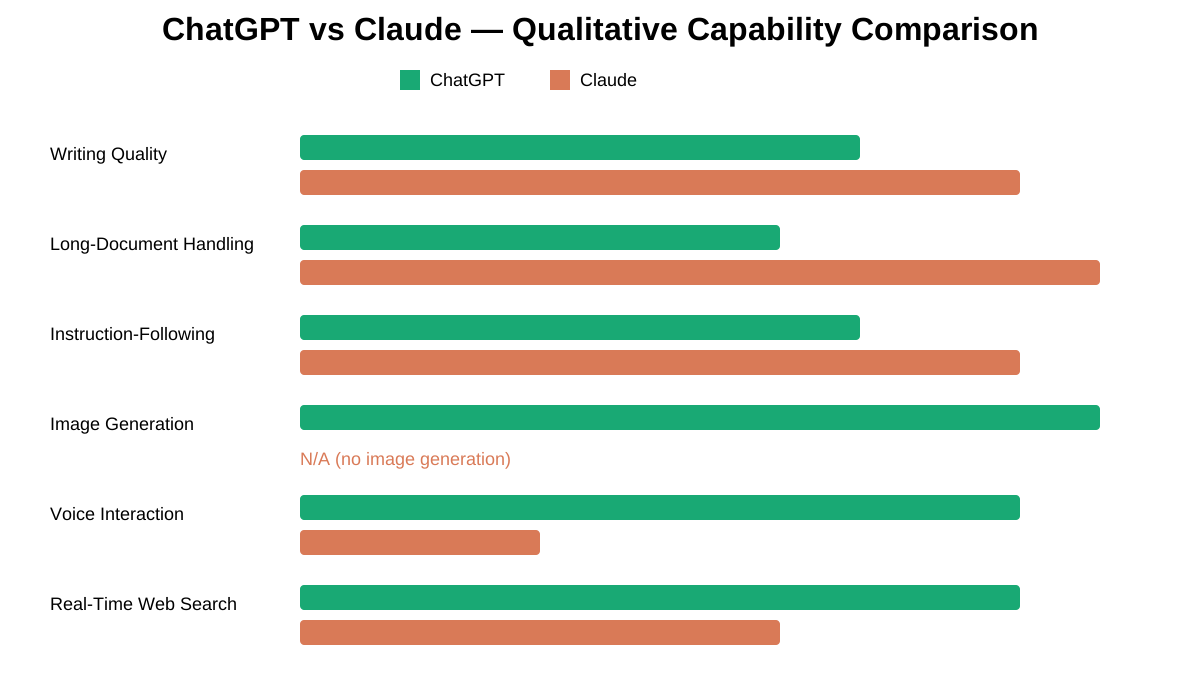
| Capability | ChatGPT | Claude | Gemini | Perplexity |
|---|---|---|---|---|
| Writing quality | Good | Strong | Good | Moderate |
| SEO content | Good | Strong | Good | Moderate |
| Long-document analysis | Moderate | Strong | Good | Limited |
| Research synthesis | Good | Strong | Good | Strong |
| Real-time web search | Strong | Moderate | Good | Strong |
| Image generation | Strong (DALL-E) | None | Good (Imagen) | None |
| Voice interaction | Strong | Limited | Good | None |
| Coding | Strong | Strong | Good | Moderate |
| Agentic coding | Good | Strong (Claude Code) | Moderate | None |
| Largest context window | Large | Largest | Large | Moderate |
| Instruction-following | Good | Strong | Good | Moderate |
| Hallucination tendency | Moderate | Lower | Moderate | Moderate |
| Google Workspace fit | Moderate | Good | Excellent | Moderate |
| Microsoft 365 fit | Strong (Copilot) | Limited | Limited | None |
When to use each:
- Gemini if your work runs through Google Docs, Gmail, or Sheets — the native integration is significantly better than either ChatGPT or Claude
- Perplexity for research that requires citations to live sources — it’s built for attribution in a way the chat assistants are not
- ChatGPT for multimodal output, voice, and Microsoft ecosystem work
- Claude for writing, documents, and instruction-heavy tasks
Model Comparison: What You’re Actually Buying
Most people say “I use ChatGPT” when they mean “I use GPT-4o.” The model matters, especially at the API level.
OpenAI Models (June 2026)
| Model | Best For | Speed | Image? | Cost Tier |
|---|---|---|---|---|
| GPT-4o | Everyday multimodal tasks | Fast | Yes (DALL-E) | Medium |
| GPT-4o mini | High-volume, cost-sensitive | Very fast | Limited | Low |
| GPT-4.1 | Coding, instruction-following | Fast | No | Medium |
| o3 | Hard reasoning, formal logic | Slow | No | High |
| o4-mini | Reasoning at lower cost | Medium | No | Medium-low |
Anthropic Models (June 2026)
| Model | Best For | Speed | Image? | Cost Tier |
|---|---|---|---|---|
| Claude Haiku | Speed-critical, high-volume | Very fast | No | Very low |
| Claude Sonnet | Balanced daily use | Fast | No | Medium |
| Claude Opus | Deepest analysis, complex tasks | Slower | No | High |
The key structural difference: OpenAI has separate product lines for reasoning (o-series) vs everyday use (GPT-4x). Anthropic integrates Extended Thinking as a toggle on the same Sonnet and Opus models — you don’t change products to get deeper reasoning, you flip a switch.
At the API level, the real competitive tier is: Claude Sonnet vs GPT-4o (balanced-tier workhorses) and Claude Haiku vs GPT-4o-mini (cheap-tier volume tools). Opus and o3 are reserved for the minority of tasks that genuinely require frontier-level capability.
Core Capability: Honest Assessment
Writing
Claude holds a voice. Run the same content brief through both — at 2,000 words, Claude at the end of a piece usually sounds like the same writer who started it. ChatGPT’s quality is good but less consistent across length. The gap closes considerably on short outputs; it’s most visible on long-form pieces with specific stylistic constraints.
The constraint-following difference documented in Test 1 is measurable and repeatable. It doesn’t mean ChatGPT can’t produce good writing — it means Claude requires fewer revision cycles on specification-heavy work.
Coding
Both are genuinely strong. The differentiator isn’t code quality on simple tasks — it’s architecture. Claude Code can navigate an existing codebase, understand the project structure, and make changes across files without losing the thread. ChatGPT’s Code Interpreter executes code in-session, which is invaluable for data analysis but doesn’t replicate the autonomous, multi-file capability of Claude Code.
For developers who don’t know which to pick: what matters is whether you’re asking “write me this function” (both equally capable) or “work on my codebase” (Claude Code is built for this; ChatGPT’s in-chat interface isn’t).
Reasoning
OpenAI’s o3 model leads on formal math and logic benchmarks. Claude’s Extended Thinking is competitive on analytical reasoning — and tends to show its reasoning more clearly in prose, which matters when you need to understand and communicate the logic, not just get an answer.
Benchmark names you’ll encounter: SWE-bench (software engineering tasks), MMLU (broad academic knowledge), GPQA (graduate-level expert reasoning), Humanity’s Last Exam (intentionally difficult frontier reasoning). We don’t quote specific scores here because they shift with every release and leaderboard positions mean less than you’d think for most real-world tasks. What matters is whether the model handles your task — and that’s only determinable from your own testing.
Long Documents
Claude’s context window (up to 200,000 tokens — roughly a 600-page book) is an actual, measurable, repeatable advantage. The legal clause test above demonstrates it at small scale. At full scale: uploading a 300-page contract and asking Claude to find every clause with a specific condition, or asking it to cross-reference three lengthy policy documents, produces more complete and accurate output than ChatGPT, which has shown some quality degradation on content positioned early in very long inputs.
If your work regularly involves documents over 50,000 words, this is the differentiator worth testing before you choose a tool.
Accuracy and Hallucination
Neither model is reliable for facts that matter without independent verification. Claude, in our testing and in patterns reported across the industry, is more likely to say “I’m not certain” rather than fill gaps with confident-sounding fiction. This is a calibration difference, not an immunity — Claude hallucinations exist. But for tasks where a wrong answer stated with confidence is worse than an acknowledged uncertainty, Claude’s caution is operationally useful.
Multimodal
ChatGPT generates images through DALL-E; Claude does not. ChatGPT’s voice mode is real-time, interruption-aware, and naturally paced; Claude’s is closer to a voice-activated text input. If either of these is core to your workflow, Claude’s writing quality advantage doesn’t offset a capability gap — it’s a genuine feature Claude doesn’t have.
AI Agents in 2026: The Emerging Battleground
Both companies are building toward AI that does things rather than AI that says things. The architectures are different.
| Agentic Capability | ChatGPT | Claude |
|---|---|---|
| Browser task automation | Operator framework (book, fill forms, navigate) | Claude in Chrome |
| Agentic coding | Code Interpreter (in-session) | Claude Code (multi-file, autonomous) |
| Tool connectivity | Proprietary GPT Store ecosystem | Model Context Protocol (open standard) |
| Office-suite agents | Copilot across Microsoft 365 | Claude in Excel, PowerPoint |
| Desktop automation | Limited at consumer tier | Cowork-style desktop automation |
The practical distinction: ChatGPT’s Operator framework is aimed at consumer browser-task automation — the kind of thing you’d do yourself but hand off to an AI. Claude’s MCP ecosystem is aimed at developer and enterprise tool connectivity — building AI-powered products that connect to your existing systems. They’re not competing for the same use case.
For teams deciding between the two for agent workflows: if you’re building something, Claude’s open MCP standard has broader third-party adoption as of mid-2026. If you want a consumer AI that handles tasks for you, ChatGPT’s Operator approach is more consumer-facing and further along.
Prompt Engineering: How Much Work Does Each Require?
This is rarely discussed but has real cost implications.
Claude is more sensitive to system prompt constraints — in a useful way. Give it a 500-word system prompt with detailed format rules, tone guidelines, and negative instructions (“never use passive voice,” “always end with a question”), and those constraints tend to hold across thousands of words of output. In our testing, Claude held all five formatting constraints in Test 1 from the first word to the last. ChatGPT held two.
The cost implication: Fewer retry cycles. In a content pipeline producing 100 pieces per week, a lower retry rate on specification-constrained output means meaningfully less human review time. The productivity gain compounds.
Where ChatGPT has a prompt-engineering advantage: Tasks where the first output needs to be immediately executable — quick code, fast answers, rapid iteration. ChatGPT’s tendency to interpret loosely and produce something rather than ask for clarification is actually faster for exploratory, low-stakes work.
The rule of thumb: If your prompts are detailed and your specifications are strict, Claude’s constraint discipline will save you time. If you’re working quickly with loose prompts, the difference is negligible.
Use Cases: 12 Specific Scenarios
For SEO
Claude. SEO content requires consistent semantic structure across long pieces, precise adherence to content briefs, and writing that doesn’t read as template-generated. Claude delivers all three more reliably. The constraint test above demonstrates the brief-adherence piece directly. For SEO agencies running hundreds of pieces monthly, the reduced revision rate is significant.
ChatGPT earns a seat at the table for keyword clustering, SERP analysis, and title-variant generation — tasks where speed matters more than sustained quality.
Direct answer: Claude is generally better for SEO content creation. It produces more naturally varied writing, follows content briefs more precisely, and avoids the formulaic patterns that increasingly signal AI content to search quality systems.
For Blogging and Content Writing
Claude, for the same reasons as SEO — voice consistency across length, brief adherence, fewer revision cycles on complex format requirements. Reach for ChatGPT when images are part of the content, since Claude cannot generate them.
For Students
Claude for studying, writing, and research. Its explanations tend to be more precise when given level-specific instructions, and it flags uncertainty rather than filling gaps with plausible-sounding wrong answers — a meaningful property when you’re trying to learn something, not just produce something. ChatGPT earns a role in presentations (DALL-E for visuals) and language practice (voice mode).
Neither belongs in a citation list.
For Coding
| Task | Better choice | Reason |
|---|---|---|
| Quick code generation | Either | Both strong |
| Debugging in-session | Either | Comparable |
| Data analysis + visualization | ChatGPT | Code Interpreter executes in-session |
| Autonomous codebase work | Claude Code | Purpose-built, multi-file |
| Large codebase review | Claude | Context window advantage |
| Architecture planning | Claude | Long-context reasoning |
For Research
Claude for synthesis once you have sources. ChatGPT for finding those sources via web search. The best research workflow uses both in sequence: ChatGPT to pull current material, Claude to read, cross-reference, and synthesize it. Our legal clause test shows the completeness advantage at small scale — the same pattern holds at research-document scale.
For Business
| Function | Better choice | Why |
|---|---|---|
| Email and communication | ChatGPT / Copilot | Microsoft 365 native |
| Contract review | Claude | Context window + completeness (Test 2) |
| Strategic planning | Claude | Long-context reasoning |
| Customer service bot | Claude | Constraint adherence, fewer surprises |
| Data analysis | ChatGPT | Code Interpreter |
For Marketing
Ideation and short-form commercial copy: ChatGPT, which tends toward more aggressive commercial phrasing. Long-form content and brand-voice compliance: Claude, which holds style guidelines more consistently. Visual concepting: ChatGPT, because Claude has no image generation. Most serious marketing teams use both — ChatGPT to find the direction, Claude to execute it.
For Affiliate Marketing
Claude. Affiliate content has to rank (SEO quality), convert (persuasive writing), and maintain disclosure compliance (instruction-following across every piece). Claude handles all three better than ChatGPT at scale, particularly the instruction-following component that ensures legal disclosure language appears in the right place across a large content batch.
For API and Developers
Choose Claude API when: your application has complex system prompts that must hold over long outputs; you’re processing large documents; you need MCP-based tool connectivity; you’re on AWS via Bedrock; safety consistency matters for your user base.
Choose OpenAI API when: your application needs image or voice generation; you’re in the Azure ecosystem; you’re building on existing fine-tuned OpenAI models.
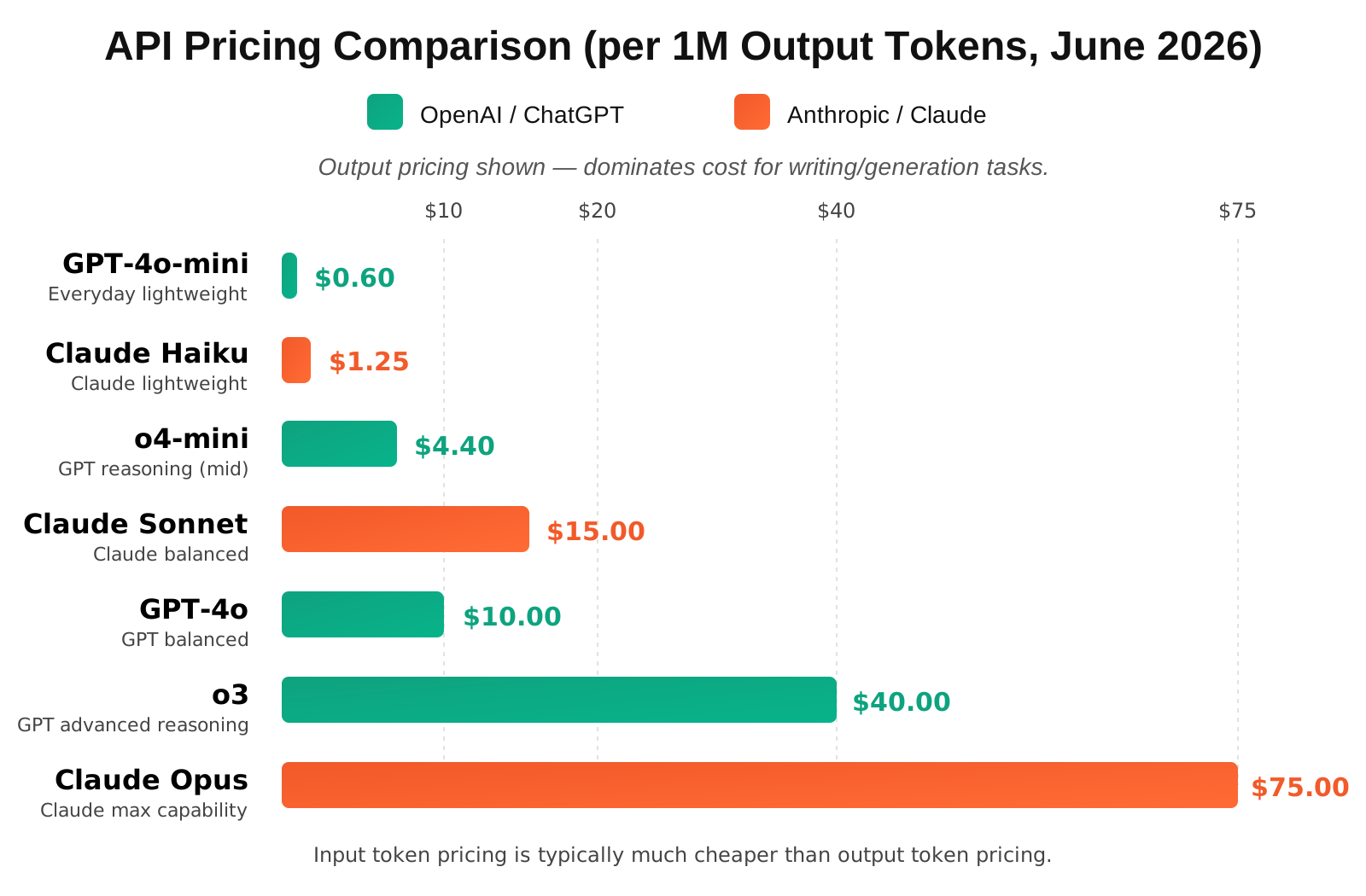
Most important API decision most teams get wrong: defaulting to frontier models (Opus, o3) for tasks a lightweight model (Haiku, GPT-4o-mini) handles equally well. The cost difference is not marginal — it’s often 10–20x per token. Tier your model usage to your task complexity.
For Long Documents
Claude, clearly. 200,000 tokens is roughly a 600-page book, which it processes in a single session with consistent retrieval accuracy across the full length. If your work involves reviewing contracts, research literature, transcripts, or technical documentation at length, this is the most impactful single capability difference between the two platforms.
For Legal Analysis
Claude. The legal clause test above demonstrates the completeness advantage on even a single short clause. At full contract scale, the difference compounds. Claude is more likely to catch every instance of a condition buried on page 47, and less likely to summarize ambiguous language as settled when it isn’t.
What neither tool replaces: attorney review. AI legal analysis is a first pass, not a final word — regardless of which platform produces it.
For Affiliate Marketing
Claude. Same logic as the Marketing section: consistent execution across a large batch of constrained-format pieces. Affiliate content at scale is an instruction-following problem as much as a quality problem, and Claude wins that comparison.
When Claude Wins But ChatGPT Is Still the Right Buy
A quality comparison and a purchase decision are two different things. Claude wins most of the individual comparisons in this article. That doesn’t make it automatically right for you. Buy ChatGPT instead — even after reading the above — if:
You need images regularly. DALL-E is integrated; Claude has no equivalent. Writing polish doesn’t offset a capability that simply doesn’t exist.
You think out loud or dictate. ChatGPT’s voice mode is built for real conversation. Claude’s is built for voice input. They’re not the same thing.
Your company is already Microsoft-native. If Copilot is licensed across your team, the integration simplicity usually outweighs Claude’s per-task quality edge. Don’t fight your existing infrastructure.
You rely on a specific third-party integration. ChatGPT’s ecosystem is larger. Verify whether your critical integration exists for Claude before assuming the better writing tool is the better overall buy.
You want memory that works automatically. ChatGPT’s cross-session memory builds itself without setup. Claude’s Projects require deliberate organization. For casual everyday AI use, the automatic approach is often more practical.
Memory and Context Persistence
Two fundamentally different approaches to the same problem.
ChatGPT Memory stores facts about you across sessions automatically. Tell it your company name, your preferred writing style, your coding language of choice — it stores these and recalls them in future conversations without any action from you. The tradeoff: it occasionally surfaces outdated or inaccurate remembered context, and memory applies globally rather than per-project.
Claude Projects are explicit workspaces. Create a project, upload your brand guidelines, load in past approved work, write specific instructions — and Claude has all of that context available for every conversation in that project. More setup, more control, more appropriate for ongoing client or matter-specific work. You know exactly what Claude has because you put it there.
| Use case | Better fit | Why |
|---|---|---|
| Everyday personal assistant | ChatGPT | Zero-setup memory |
| Ongoing client work | Claude Projects | Context per client, not global |
| High-stakes sensitive work | Claude Projects | You control what’s remembered |
| Team collaboration | Claude Projects | Shareable workspaces |
Context Window Reality
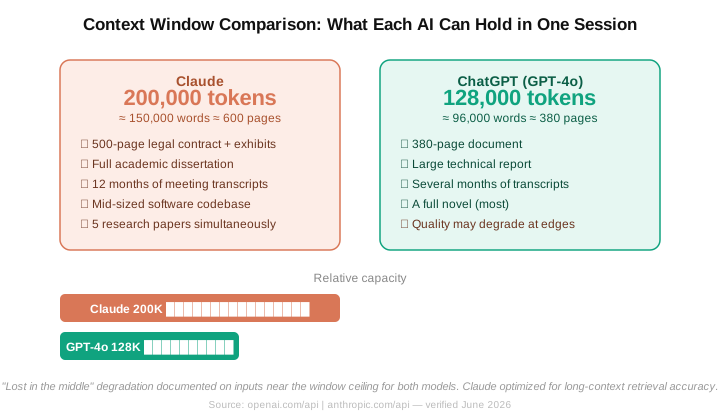
Claude’s documented context window is up to 200,000 tokens — approximately 150,000 words, or a 600-page book.
What that actually fits in a single session:
- A full-length legal contract plus all its exhibits
- Twelve months of weekly meeting transcripts
- A mid-sized software codebase
- Multiple academic papers for cross-referencing simultaneously
ChatGPT’s GPT-4o window is 128,000 tokens — meaningful, but about 35% smaller, and with documented quality degradation on content positioned early in very long inputs.
The practical threshold: below 50,000 words, both tools perform well and the window size rarely determines the outcome. Above 100,000 words, Claude’s larger window and more consistent retrieval become a measurable, repeatable advantage rather than a theoretical one.
Mobile Experience
| Feature | ChatGPT (iOS / Android) | Claude (iOS / Android) |
|---|---|---|
| Voice conversation | Advanced Voice Mode — real-time | Voice input (dictation-style) |
| Image generation | Yes (DALL-E) | No |
| File uploads | Yes | Yes |
| Camera / photo analysis | Yes | Yes |
| App speed (general) | Fast | Fast |
| Memory / context | Cross-session memory | Projects-based |
The mobile gap is almost entirely in voice. If hands-free, real-time spoken conversation with an AI is part of your use case, ChatGPT’s voice mode is meaningfully more developed. For everything else — text queries, document uploads, photo analysis — the mobile experience is broadly comparable.
AI Search and Citation Visibility
Both tools are simultaneously AI assistants and AI search surfaces. Content that gets cited in their responses carries a different kind of visibility than a traditional backlink.
ChatGPT (with web search): Retrieves and cites specific URLs. Favors: recent, factually specific, directly structured content. Content behind paywalls or with aggressive bot-blocking is typically not retrieved.
Claude (with web search): Similar retrieval behavior; larger context window means it can process and quote from longer documents more accurately once retrieved.
Perplexity: The most citation-forward of the major AI engines — almost always shows 4-6 sources per answer. Favors recently published content, factually dense material, and directly structured answers near the top of the page.
Google AI Overviews: Pulls from the Google index. Standard SEO signals determine eligibility. Tables, FAQ structured data, and direct-answer formatting near the top of the page improve extraction.
How to optimize for AI citation: Write a direct answer block in the first 150 words of every section that targets a common question. Use headings that mirror query phrasing. Keep a current last-updated date prominent. Make sure each H2 section reads coherently as a standalone excerpt — because that’s often what an AI engine extracts and surfaces.
Security and Compliance
Consumer plan comparisons ($20/month) don’t answer the questions compliance teams actually ask.
| Standard | ChatGPT Enterprise / Azure OpenAI | Claude Enterprise |
|---|---|---|
| SOC 2 Type II | Yes | Yes |
| GDPR | Yes (EU residency via Azure) | Yes |
| HIPAA | Yes (BAA required, Enterprise only) | Yes (BAA required, Enterprise only) |
| CCPA | Yes | Yes |
| FedRAMP | In progress (Azure Gov route) | Verify current status |
| SSO / SAML | Yes (Enterprise) | Yes (Enterprise) |
| Audit logs | Yes (Enterprise) | Yes (Enterprise) |
| Zero data retention | Yes (API / Azure) | Yes (API / Enterprise) |
Critical point for healthcare and finance: HIPAA compliance requires a signed Business Associate Agreement. BAAs are only available on Enterprise tiers. Standard Plus, Pro, and Team plans on either platform are not HIPAA-eligible. Do not process patient information or protected health information on standard paid plans.
For US-based users with CCPA concerns: Both platforms allow data access, deletion, and opt-out requests. Activate your privacy settings before beginning any work with sensitive data, not after.
Status pages: status.openai.com | status.anthropic.com
API Pricing Deep Dive
Prices in USD per million tokens, based on publicly available pricing at time of publication. Verify at openai.com/pricing and anthropic.com/pricing before building a budget.
| Model | Input ($/1M) | Output ($/1M) | Cached Input | Batch |
|---|---|---|---|---|
| GPT-4o | ~$2.50 | ~$10.00 | ~$1.25 | ~50% off |
| GPT-4o mini | ~$0.15 | ~$0.60 | ~$0.075 | ~50% off |
| o3 | ~$10.00 | ~$40.00 | ~$2.50 | Limited |
| o4-mini | ~$1.10 | ~$4.40 | ~$0.275 | ~50% off |
| Claude Haiku | ~$0.25 | ~$1.25 | ~$0.03 | Available |
| Claude Sonnet | ~$3.00 | ~$15.00 | ~$0.30 | Available |
| Claude Opus | ~$15.00 | ~$75.00 | ~$1.50 | Available |
Cost-Per-Task Reference
| Task | GPT-4o | Claude Sonnet | Notes |
|---|---|---|---|
| One 1,500-word article | ~$0.04–0.08 | ~$0.05–0.10 | Output-heavy; output rate dominates |
| 100 SEO articles | ~$4–8 | ~$5–10 | Use batch pricing to cut in half |
| 1M input tokens (document analysis) | ~$2.50 | ~$3.00 | Input-heavy; comparable |
| 1,000 support tickets (~200 tokens) | ~$0.12–0.24 | ~$0.10–0.20 | Use Haiku/mini; drops to <$0.02 |
| Code review (5K token file) | ~$0.015 | ~$0.02 | Negligible at this scale |
The most commonly missed cost lever: Cached context pricing. Both platforms charge 70–90% less for input tokens that appear in a cached prompt prefix. For applications with large, fixed system prompts (legal guidelines, brand style guides, product catalogs) used across thousands of API calls, activating prompt caching is one of the highest-leverage cost optimizations available — and it’s frequently overlooked.
The single biggest API cost mistake: Using frontier models (Opus, o3) for tasks that standard models (Sonnet, GPT-4o) handle identically. The cost difference is 5–10x. Tier your models to your tasks.
Best AI by Budget
| Budget | Recommendation |
|---|---|
| Free only | Test both free tiers on your actual task — quality is usable on both |
| ~$20/month (one tool) | Writing/research/documents → Claude. Images/voice/Microsoft → ChatGPT |
| ~$40/month (both) | Run both — Claude for analysis/writing, ChatGPT for multimodal. Increasingly common |
| Team / Business | Match to your team’s dominant workflow |
| Enterprise | AWS-based orgs → Claude (Bedrock). Microsoft-based orgs → OpenAI (Azure) |
Best AI for Small Business
| Business Type | Better fit | Why |
|---|---|---|
| Solo blogger | Claude | Voice consistency, brief adherence |
| Freelance writer | Claude | Long-form quality |
| Startup founder | Both | Decks/visuals (ChatGPT) + documents/writing (Claude) |
| Agency owner (content/SEO) | Claude | Brand-voice consistency across clients |
| Ecommerce store | ChatGPT | Product image generation + fast listing copy |
| SaaS company | Claude | Documentation consistency, reliable support bot |
Where Each Tool Frustrates Users
Where ChatGPT Frustrates Users
Memory surfacing outdated or incorrect recalled context from earlier sessions. Responses running longer than needed when brevity would serve better. Confusion over which model version to use for a given task. Instructions drifting partway through long, specification-heavy outputs.
Where Claude Frustrates Users
Usage rate limits that interrupt long working sessions, particularly on lower-tier plans. Occasional over-caution on requests that are ambiguous but clearly legitimate. A narrower set of third-party integrations requiring workarounds that ChatGPT users wouldn’t need.
Who Should NOT Use ChatGPT or Claude
| Situation | Better fit | Why |
|---|---|---|
| Research requiring inline citations to live sources | Perplexity AI | Built for attributed real-time retrieval |
| Heavy Google Workspace (Docs, Gmail, Sheets) | Google Gemini | Native integration throughout |
| Microsoft-only enterprise | Microsoft Copilot | Purpose-built for the M365 + Azure environment |
| In-IDE code completion specifically | GitHub Copilot | Tighter VS Code / JetBrains integration |
| Regulated work requiring zero data retention | Enterprise/on-prem deployment | Consumer tiers not designed for this |
| Quick factual lookup | Standard search engine | No conversational overhead needed |
Best AI by Profession
| Profession | Better fit | Why |
|---|---|---|
| Blogger / Content writer | Claude | Voice consistency, brief adherence |
| SEO specialist | Claude | Semantic consistency, content-brief discipline |
| Software developer | Claude Code (codebase) / ChatGPT (data) | Different tools for different tasks |
| Lawyer / Paralegal | Claude | Context window, completeness (see Test 2) |
| Researcher / Analyst | Claude (synthesis) + ChatGPT (live search) | Best used in sequence |
| Designer | ChatGPT | DALL-E image generation |
| Marketing manager | Both | Ideation (ChatGPT) + production (Claude) |
| Student | Claude | Precise explanations, calibrated uncertainty |
| Customer support lead | Claude | Consistent instruction adherence for bots |
| Executive assistant (Microsoft) | ChatGPT / Copilot | Microsoft 365 native |
| Affiliate marketer | Claude | SEO quality + scale + disclosure compliance |
| Recruiter | Claude | JD writing, consistent tone, fair language |
Workflow Examples: Using Both Together
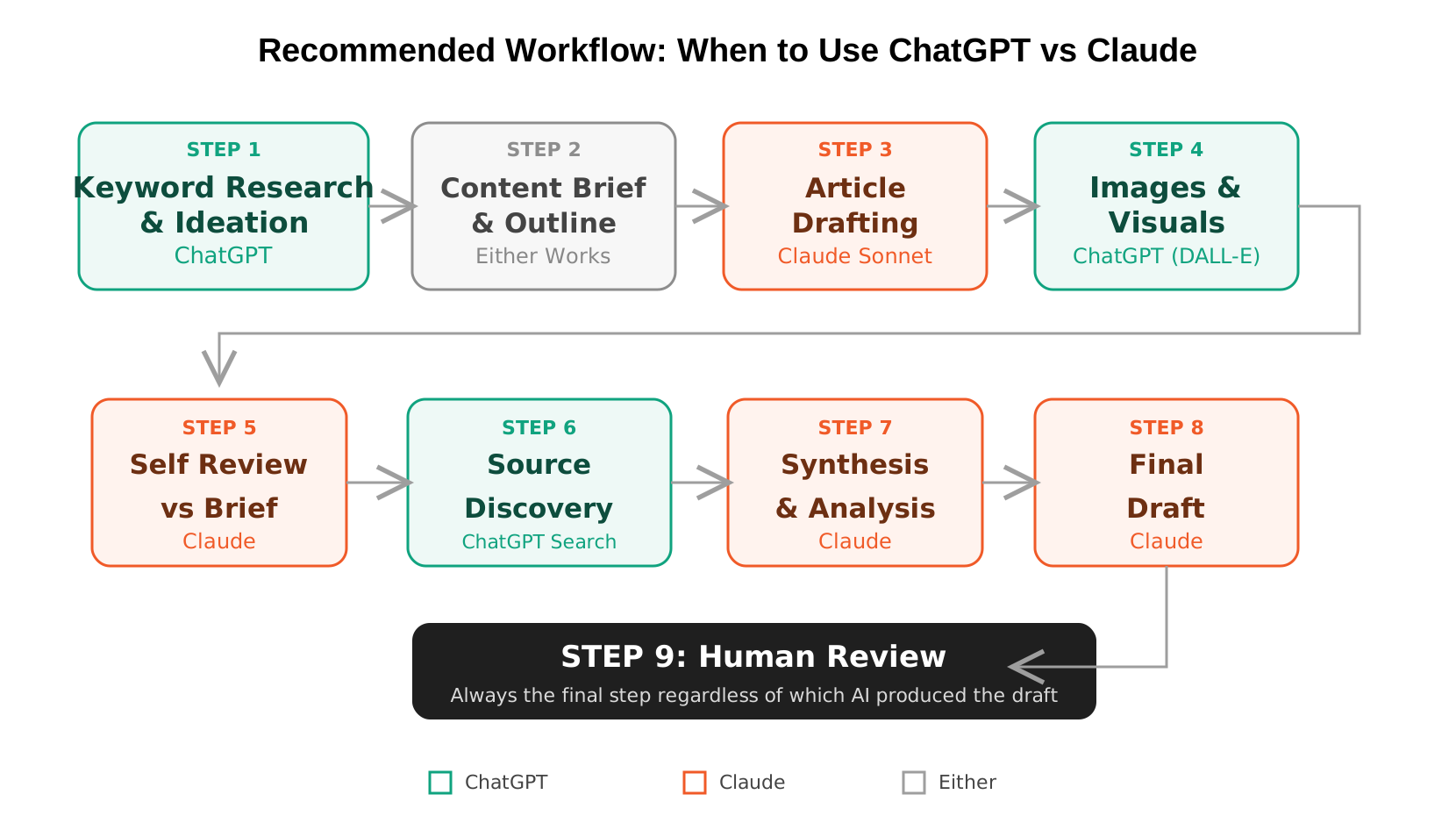
SEO Content Workflow
Step 1 — Topic and keyword strategy: ChatGPT Seed keywords → intent clustering → competitor gap analysis → article outline. GPT-4o handles this quickly and generates a wider range of angle options.
Step 2 — Article drafting: Claude Sonnet Paste the full brief with explicit instructions: word count, heading structure, tone, NLP terms, negative constraints. Claude holds these across a full 2,000+ word output more reliably than ChatGPT.
Step 3 — Featured images: ChatGPT (DALL-E) Claude cannot generate images.
Step 4 — Self-review against brief: Claude Paste the draft and original brief back into Claude and ask it to flag where the piece drifted from requirements. More reliable than asking the same tool that wrote the piece to self-critique.
Step 5 — Human review. Always.
Research and Analysis Workflow
Step 1 — Source discovery: ChatGPT with web search Find recent publications, studies, news coverage. ChatGPT’s web search is more mature for current-source retrieval.
Step 2 — Document synthesis: Claude Upload the actual source documents. Claude’s context window and retrieval accuracy make it the stronger synthesis engine once you have the material.
Step 3 — Cross-referencing: Claude With multiple documents in context, find where sources agree, conflict, and leave gaps.
Step 4 — Draft: Claude Emerges from the same session; context is already loaded.
Developer / API Workflow
Step 1 — Architecture planning: Claude Opus or o3 Extended Thinking or o3 for complex system design. Either works; pick based on your infrastructure.
Step 2 — Code generation: Claude Sonnet or GPT-4.1 Both strong. Use Claude Code for codebase-level work; standard interface for isolated generation.
Step 3 — In-session testing: ChatGPT Code Interpreter If you need the AI to run code and show output, Code Interpreter is the tool.
Step 4 — Documentation: Claude Technical docs and README writing consistently benefit from Claude’s tone consistency and formatting adherence.
Industry-Specific Recommendations
Legal Professionals
Claude for contract review, deposition transcript analysis, regulatory filing review, and research synthesis — all tasks benefiting from its large context window and systematic extraction (see Test 2). Build a Project per client matter with relevant documents loaded. Always apply qualified attorney review regardless of tool.
Healthcare (Non-Clinical)
Do not use free or standard paid tiers for PHI — HIPAA requires an enterprise BAA. For clinical literature review, research synthesis, and medical writing: Claude. For patient communication materials: either works.
Accountants and Finance
Long financial statements and audit documentation: Claude, for context window. In-spreadsheet calculation and data analysis: ChatGPT’s Code Interpreter or Microsoft Copilot in Excel, which actually execute computations rather than describing them.
Marketing Agencies
Claude as the primary production tool for brand-voice compliance. ChatGPT for creative concepting and visual mockups. Deliberate split between ideation platform and production platform prevents the creative homogeneity that comes from using the same tool for both.
SaaS and Startups
Customer-facing bots and support tools: Claude, for consistency and instruction adherence. Product documentation: Claude. Pitch materials requiring visual elements: ChatGPT. API infrastructure on AWS: Claude via Bedrock. Azure: OpenAI.
Ecommerce
Product listing copy at volume: ChatGPT, which produces faster variations and more commercially aggressive phrasing. Product photography and image creation: ChatGPT (DALL-E). Long-form buying guides and category pages: Claude.
Recruiters and HR
Job descriptions: Claude — follows tone, level, and inclusivity guidelines consistently across a batch. AI outputs should not be the basis for hiring decisions without human review; AI-generated candidate assessments may introduce bias with legal exposure under US employment law.
Migration Guide
Switching from ChatGPT to Claude
Export your history: Settings → Data Controls → Export Data. OpenAI delivers a .zip with your conversations in JSON. Arrives within minutes to a few hours.
Don’t transfer everything. Most conversation history isn’t worth migrating. What is: refined prompt templates, your Custom Instructions (Settings → Personalization → Custom Instructions).
Rebuild Custom Instructions as Project instructions. Claude’s Project instruction context is larger and followed more consistently. This is often an improvement, not just a translation.
Test your prompts first. Claude’s higher sensitivity to detailed instructions means prompts that worked loosely in ChatGPT may work better in Claude without modification. Test before assuming anything needs rewriting.
Plan for missing features. Image generation, mature voice mode, some specific integrations. “Switching to Claude” and “never opening ChatGPT again” are two different decisions.
Switching from Claude to ChatGPT
Export Claude data: Settings → Privacy → Export Data.
Translate Project instructions to Custom Instructions. ChatGPT’s custom instruction field is shorter than Claude’s project instruction space — you’ll need to distill.
Identify long-context tasks that need a new approach. If you’ve been using Projects to hold large documents as persistent context, you’ll need per-session uploads or a RAG pipeline in ChatGPT.
API Migration
- System prompt behavior: Claude follows detailed system prompts more consistently; test your prompts explicitly on both
- Output format defaults: differ between models; if you’re parsing structured output, test your parser against actual responses
- Cost modeling: input/output ratios and typical response lengths differ; recalculate expected token usage
- Both APIs support streaming with similar but not identical implementations
Pros and Cons
ChatGPT Pros
DALL-E image generation. More capable real-time voice mode. More mature, seamlessly integrated web search. Largest third-party integration ecosystem. Deep Microsoft 365 integration via Copilot. Automatic cross-session memory. Code Interpreter for in-session execution. Leads formal math and logic benchmarks (o-series).
ChatGPT Cons
Higher rate of confident-but-wrong answers in our testing. Less consistent constraint adherence over long outputs (demonstrated in Test 1). Some accuracy degradation on content positioned early in very long inputs. Can be verbose when brevity would serve better.
Claude Pros
Consistent writing quality with documented constraint adherence. 200K token context window for long-document work. Systematic extraction completeness (demonstrated in Test 2). Tends to acknowledge uncertainty rather than fabricate. Claude Code for serious agentic coding. Extended Thinking for complex reasoning without switching models.
Claude Cons
No image generation — a genuine gap, not a minor omission. Voice interaction is dictation-style, not conversational. Smaller third-party ecosystem. Occasional over-caution on ambiguous requests. Memory system requires deliberate setup vs ChatGPT’s automatic approach.
Privacy and Data
Both platforms default to using conversation data for model training unless you opt out — check settings on either platform before sharing sensitive material. Team and Enterprise tiers on both sides include stronger contractual protections, including formal Data Processing Agreements. Neither free tier is appropriate for confidential client data, PHI, or financial information.
US-based users should check CCPA rights on both platforms. Regulated industries need Enterprise contracts with explicit BAAs and data retention terms — standard paid plans don’t cover this.
Status pages: status.openai.com | status.anthropic.com
Pricing Summary
Verify at openai.com/pricing and anthropic.com/pricing. Prices are in USD, billed monthly, and may vary by region.
| Tier | ChatGPT | Claude |
|---|---|---|
| Free | GPT-4o rate-limited, basic tools | Claude Sonnet rate-limited |
| Individual (~$20/mo) | GPT-4o, o4-mini, images, voice, memory | Sonnet + Opus, Projects |
| Team / Business | Higher limits, admin, workspace | Higher limits, shared Projects |
| Enterprise | Custom, SSO, compliance, SLA | Custom, compliance, audit logs |
Decision Framework: MATCH
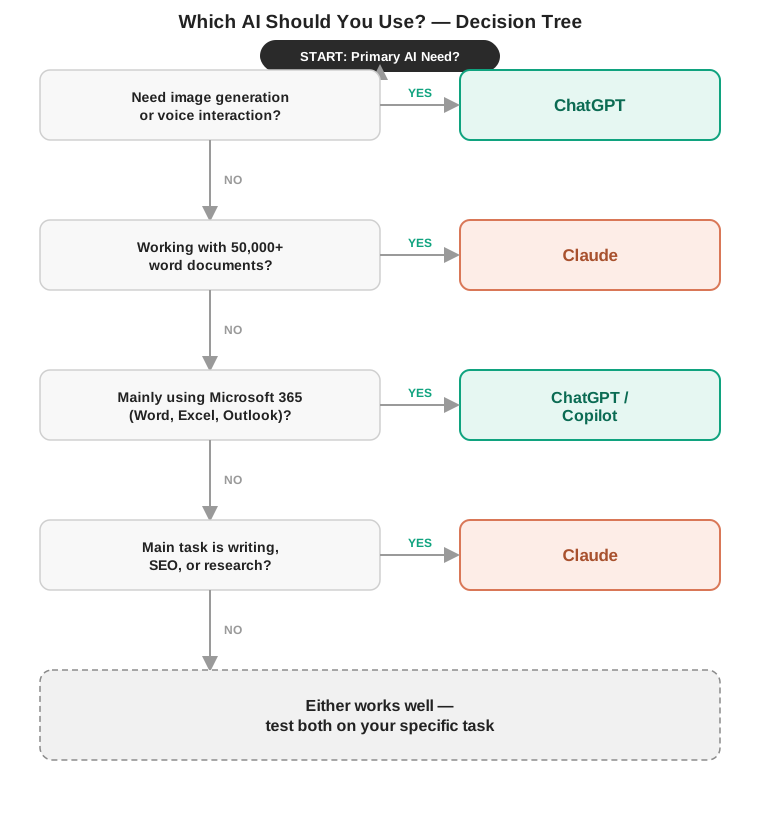
M — Mode of Output: Images → ChatGPT. Voice → ChatGPT. Text → either.
A — Amount of Input: 50,000+ words → Claude.
T — Task Type: Writing/SEO/research/documents → Claude. Multimodal/ideation → ChatGPT. Agentic coding → Claude Code. Formal math/logic → o-series.
C — Current Ecosystem: Microsoft 365 → ChatGPT/Copilot. Google Workspace → Claude + Gemini. AWS → Claude/Bedrock.
H — High-Stakes: Legal/medical/financial → Claude + mandatory expert review regardless of tool.
What Neither Tool Does Well
Both hallucinate — neither is a reliable factual source without independent verification. Both struggle with genuinely novel problems beyond pattern recombination from training. Neither replaces a lawyer, doctor, financial advisor, or engineer on decisions that carry weight. Output quality varies session to session. Neither should operate autonomously in production without human oversight. Both are unaware of very recent events without web search enabled.
Future Direction
OpenAI is building toward ambient, always-on multimodal AI — video (Sora), voice, and agentic task completion woven into everyday life through the Microsoft ecosystem. The o-series trajectory points toward increasingly capable formal reasoning at falling cost.
Anthropic is investing heavily in interpretability research — understanding why specific model outputs occur, with direct implications for enterprise safety and reliability assurance. Claude Code and the MCP ecosystem signal a deliberate bet on developer and enterprise workflows rather than consumer breadth.
The shared trajectory: longer context windows, better agents, more sophisticated memory, falling inference costs, and increasing regulatory pressure from the EU and US federal level. The context window advantage Claude holds today will shrink as OpenAI extends theirs; the safety and interpretability advantage Anthropic is building is slower to copy.
Frequently Asked Questions
Is ChatGPT or Claude better in 2026?
Neither is universally better. Claude leads in writing quality, constraint adherence, long-document analysis, and research synthesis. ChatGPT leads in image generation, voice interaction, real-time web search, and Microsoft ecosystem integration. The right choice depends on your primary task.
Is Claude better than ChatGPT for SEO?
Yes, for most SEO content production — Claude follows content briefs more precisely and maintains semantic consistency across long articles more reliably than ChatGPT.
Which AI has the lowest hallucination rate?
Claude tends to acknowledge uncertainty more often rather than generating confident-but-wrong answers. Both models hallucinate; neither should be a sole factual source for decisions that matter.
Can I use ChatGPT and Claude together?
Yes — many professionals do. Claude for writing, document analysis, and research synthesis; ChatGPT for image generation, voice interaction, and Microsoft 365 tasks.
Which AI is better for students?
Claude for studying, writing, and research. ChatGPT for presentations requiring images or language practice via voice.
ChatGPT or Claude for coding?
Both are strong for standard coding. Claude Code for autonomous multi-file codebase work. ChatGPT’s Code Interpreter for data analysis with in-session execution.
Which AI is better for research?
Claude for deep document synthesis. ChatGPT for live web retrieval. Used sequentially, they outperform either alone.
Is Claude or ChatGPT better for legal analysis?
Claude — see Test 2. The completeness advantage on clause extraction is consistent and repeatable. AI legal output requires attorney review regardless.
Which AI handles long documents better?
Claude, by a clear margin. 200K token context window; consistent retrieval accuracy across the full length.
Can Claude generate images?
No. Claude has no image generation capability. ChatGPT integrates DALL-E.
Which AI is better for real-time web search?
ChatGPT — more mature integration, more seamlessly built into everyday use.
Is ChatGPT or Claude more private?
Both default to settings that may use conversation data for training. Both offer opt-out and stronger protections on paid plans.
What is OpenAI’s o-series?
Reasoning-specialized models that spend extra compute thinking before responding — stronger on formal math and multi-step logic than the standard GPT-4 line.
Does Claude have a reasoning mode like o3?
Yes — Extended Thinking, available as a toggle on Claude Sonnet and Opus. You don’t switch products to access it.
What’s the best AI on a tight budget?
Test both free tiers on your actual task before paying for either.
What’s the best AI for small business?
Depends on the business type — see the Best AI for Small Business table above.
Who should NOT use ChatGPT or Claude?
Heavy Google Workspace users (Gemini), Microsoft-only enterprises (Copilot), research requiring live citations (Perplexity), in-IDE code completion (GitHub Copilot).
Does Claude have AI agents?
Yes — Claude Code for autonomous coding, Claude in Chrome for browser tasks, built on the open Model Context Protocol. Different architecture than ChatGPT’s Operator framework; aimed more at developer workflows than consumer task automation.
Which is better for an enterprise with data compliance requirements?
Both offer SOC 2, HIPAA (with BAA, Enterprise only), GDPR, and SSO on Enterprise tiers. Azure OpenAI has more mature data residency options for EU-based requirements. Verify current FedRAMP status for either platform directly.
Conclusion
The question this article started with — “which AI is better?” — turns out to be a slightly wrong question. A more useful question is: better at what, for whom, in which context?
Claude wins most of the direct quality comparisons in this guide. It held more constraints in Test 1. It found more risks in Test 2. It produces more complete extractions, more consistent long-form prose, and more predictable behavior on specification-constrained work. If writing quality, document analysis, and instruction-following are what you measure, Claude tends to win.
And yet: if you generate images, you need ChatGPT. If you have real-time voice conversations, you need ChatGPT. If your company runs on Microsoft 365, you probably need ChatGPT. A tool’s quality score doesn’t matter if it can’t do the thing you need.
The practical answer for most professionals is: start with the free tier of whichever tool seems most relevant to your primary work. Run your actual tasks — not demo tasks — through it. If you outgrow the free tier, the $20/month difference between running one tool and running both is small enough that the question usually isn’t “which one” but “which one for what.”
Start here: Run Test 1’s writing prompt through both tools’ free tiers this week. Give them the same brief, the same constraints, and read both outputs end to end. An hour of direct comparison against your own work tells you more than any comparison article.
📖 Continue Reading:
Sources & References