

⚡ Quick Answer: Technical SEO Checklist for New Websites
A technical SEO checklist is a sequenced list of the technical fixes a website needs so search engines — and increasingly, AI systems like AI Overviews — can crawl, index, and understand it correctly. For a new website, the essentials break into five areas: crawlability & indexing, site architecture, Core Web Vitals & mobile performance, security, and structured data. Get those five right before and immediately after launch, and you avoid the vast majority of costly, hard-to-diagnose SEO problems new sites run into.
What Is Technical SEO? (And How It’s Different From a Full Audit)
Technical SEO is the practice of making sure a website’s infrastructure — its code, server configuration, and file structure — allows search engines to crawl, render, index, and rank its pages. If a search engine can’t reach or understand a page, nothing else about that page matters.
What Technical SEO Covers vs. On-Page and Off-Page SEO
Think of it in three layers. Technical SEO is the foundation — can a crawler get in, read the page, and index it correctly? On-page SEO sits on top of that — is the content itself relevant, well-structured, and useful for the query? Off-page SEO is external — do other sites vouch for this one through links and mentions? A new website with brilliant content but a broken robots.txt file will never get the chance to prove that content is good, because search engines never see it.
Technical SEO Checklist vs. Technical SEO Audit — What’s the Difference?
These terms get used interchangeably, but they’re not the same thing, and mixing them up wastes time. A technical SEO audit is a diagnostic process — you’re investigating an existing site to find out what’s currently broken, using crawl reports, log files, and analytics data. A technical SEO checklist (this article) is prescriptive — a known list of items to configure correctly, most useful before problems exist, i.e., during a build or launch. If your site is already live and something feels wrong, use this checklist as a self-audit by working through each item and flagging anything that fails. If you’re pre-launch, use it exactly as written, in order.
Why Technical SEO Matters More at Launch Than Later
Technical mistakes made at launch are disproportionately expensive because they compound silently. A missing sitemap on a five-page site is a quick fix; a missing sitemap on a site that’s grown to 5,000 pages over two years, discovered only after noticing stagnant organic traffic, means months of under-indexed content. Getting the foundation right before a single page is indexed is the cheapest technical SEO work you will ever do on that site.
How to Use This Checklist (Launch-Stage Framework)
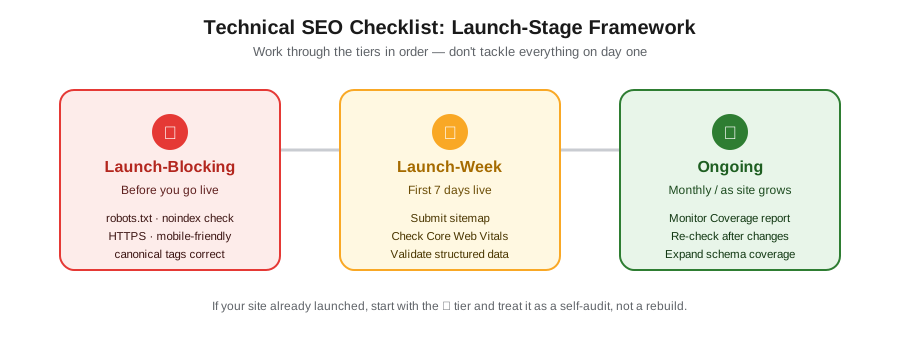
Not every item on a technical SEO checklist needs to happen on the same day. Trying to do everything at once is exactly what causes items to get skipped. Instead, this checklist is organized into three urgency tiers, and every item below is tagged with one:
| Tier | Meaning | Timing |
|---|---|---|
| 🔴 Launch-Blocking | If this is wrong, your site may not get indexed at all, or will index incorrectly in a way that’s hard to reverse | Before you go live |
| 🟡 Launch-Week | Important for how the site performs in search, but a short delay won’t cause lasting damage | First 7 days after going live |
| 🟢 Ongoing | Needs periodic attention as the site grows, not a one-time task | Monthly / as the site scales |
How to Adapt This Checklist If You’re Auditing an Existing New Site
If your site already went live — planned or not — don’t panic and don’t skip ahead. Work through the 🔴 Launch-Blocking items first as if you were about to launch today; these are the ones most likely to be silently costing you visibility right now. The dedicated Silent Failures section further down is specifically written for this situation.
Part 1 — Crawlability & Indexing Checklist
This is the most important category on the entire list. If search engines can’t crawl and index your site, nothing else here matters.
Set Up and Verify Your robots.txt File
- 🔴 Create a robots.txt file at your site’s root (yoursite.com/robots.txt). This plain-text file tells crawlers which parts of your site they’re allowed to access, following the Robots Exclusion Protocol — an official IETF internet standard since 2022. Why it matters: Without one, crawlers assume everything is allowed by default, which is usually fine — but the far more common and dangerous new-site mistake is the opposite: a leftover
Disallow: /from a staging environment blocking the entire live site. Verify with: Visit yoursite.com/robots.txt directly in a browser, and check the robots.txt report in Google Search Console.
Create and Submit an XML Sitemap
- 🔴 Generate an XML sitemap listing your indexable URLs and submit it in Search Console. Google’s own sitemap guidelines cap a single sitemap file at 50MB uncompressed or 50,000 URLs — plenty for a new site, but worth knowing before you scale. Why it matters: A sitemap doesn’t guarantee indexing, but it’s the fastest way to tell Google your full set of pages exists, especially before you’ve built any external links pointing to them. Verify with: The Sitemaps report in Google Search Console should show “Success,” not “Couldn’t fetch.”
Check for Accidental “noindex” Tags
- 🔴 Confirm no page carries an unintended
noindexmeta tag orX-Robots-Tagheader. This is the single most common new-site launch mistake: development environments are often intentionally set to noindex, and that setting doesn’t always get removed when the site goes live. Why it matters: Google’s own guidance on blocking indexing is unambiguous — a noindexed page will not appear in search results no matter how good everything else is. Verify with: The URL Inspection tool in Search Console for key pages, or view-source on a handful of pages checking the<head>for<meta name="robots" content="noindex">.
Verify Your Site in Google Search Console (and Bing Webmaster Tools)
- 🔴 Verify ownership in Google Search Console and, ideally, Bing Webmaster Tools too. Why it matters: Search Console is the primary lens into how Google actually sees your site — indexing status, Core Web Vitals, structured data, and manual actions all live here. You can’t fix what you can’t see. Verify with: Once verified, the Search Console home dashboard should populate with your property’s data within a few days.
Fix Orphan Pages and Crawl Depth Issues
- 🟡 Make sure every important page is reachable through internal links, not just the sitemap. Why it matters: A page with zero internal links pointing to it — an “orphan page” — is harder for crawlers to find and signals low importance even if Google does discover it via the sitemap. Verify with: A free crawl using Screaming Frog’s free tier (up to 500 URLs) or Ahrefs’ Site Audit, checking the “orphan pages” report.
Part 2 — Site Architecture & URL Structure Checklist
Architecture decisions made in week one are expensive to change in year two. Get the structure right while the site is still small.
Build a Logical Site Hierarchy
- 🟡 Organize pages into a clear hierarchy — homepage → category → subcategory → page — rather than a flat structure where everything sits one level below the homepage. Why it matters: A logical hierarchy helps both users and crawlers understand which pages are related and how important each one is relative to the rest of the site. Verify with: Draw or export your planned sitemap structure before launch; if you can’t explain the hierarchy in one sentence, it’s probably too flat or too deep.
Use Clean, Descriptive URLs
- 🟡 Keep URLs short, lowercase, hyphen-separated, and descriptive (yoursite.com/services/technical-seo, not yoursite.com/p?id=482). Why it matters: Clean URLs are easier to read, share, and remember, and they avoid duplicate-content issues caused by dynamic parameters generating multiple URLs for the same content. Verify with: A quick manual review of your top 20 planned URLs before launch.
Set Up Internal Linking From Day One
- 🟡 Link new pages from relevant existing pages as soon as they’re published, not as an afterthought. Why it matters: Internal links are how both users and crawlers navigate and understand relationships between pages; a page with no incoming internal links is functionally invisible to a crawler unless it’s in the sitemap. Verify with: A site crawl checking “inlinks” per page — every important page should have at least a few internal links pointing to it.
Resolve Canonical Tag Issues (Especially Staging-to-Live Carryover)
- 🔴 Check that every live page’s canonical tag points to itself on the live domain — not to a staging subdomain, an old domain, or the wrong URL variant. Why it matters: Canonical tags are one of the strongest signals Google uses for choosing which URL to index when duplicates exist; a canonical accidentally still pointing at staging.yoursite.com tells Google the live page isn’t the “real” one. Verify with: View-source on your homepage and a handful of key pages, checking the
<link rel="canonical">tag in the<head>, or use the Rich Results Test which also surfaces canonical info.
Part 3 — Core Web Vitals & Mobile Performance Checklist
Google evaluates real-world page experience through three specific measurements. As of Google’s current guidance, the Core Web Vitals thresholds are:
| Metric | Measures | Good Threshold |
|---|---|---|
| LCP (Largest Contentful Paint) | Loading performance | Under 2.5 seconds |
| INP (Interaction to Next Paint) | Responsiveness | Under 200 milliseconds |
| CLS (Cumulative Layout Shift) | Visual stability | Under 0.1 |
Understand the Three Core Web Vitals (LCP, INP, CLS)
- 🟡 Test your homepage and 2–3 key template pages against all three thresholds above before or immediately after launch. Why it matters: Core Web Vitals are one of the factors Google’s ranking systems consider as part of overall page experience — and, separately, slow or janky pages simply lose users regardless of ranking impact. Verify with:PageSpeed Insights (Google’s current recommended tool). Note that a brand-new site often lacks enough real-world traffic data for “field data” scores initially — lean on the “lab data” scores until field data populates.
Test and Fix Mobile-Friendliness
- 🔴 Confirm your site renders correctly on mobile devices — readable text without zooming, tap targets that aren’t cramped, no horizontal scrolling. Why it matters: Google completed its rollout of mobile-first indexing across the entire web in July 2024, meaning the mobile version of your site — not the desktop version — is what Google primarily crawls, indexes, and ranks. Verify with: Google retired its standalone Mobile-Friendly Test tool and Mobile Usability report in December 2023. The current recommended path is running a Lighthouse audit (built into Chrome DevTools, or accessible via PageSpeed Insights) and manually checking your site on an actual phone.
Optimize Images and Page Weight
- 🟡 Compress images, use modern formats (WebP/AVIF), and set explicit width/height attributes to prevent layout shift. Why it matters: Unoptimized images are the most common cause of both slow LCP and high CLS on new sites, especially sites built quickly on page builders with default image settings. Verify with: PageSpeed Insights flags oversized images by name with potential savings; fix the largest offenders first.
Part 4 — Security & Trust Signals Checklist
Install HTTPS/SSL Correctly Site-Wide
- 🔴 Install a valid TLS/SSL certificate and serve every page over HTTPS, with no mixed-content warnings (HTTP resources loading on an HTTPS page). Why it matters: Google’s HTTPS guidance explicitly recommends site-wide HTTPS to protect user data, and Google has indexed HTTPS pages by default since 2015 when both versions exist. Verify with: Check for the padlock icon in the browser address bar on every major page template, and confirm your CMS or hosting isn’t accidentally serving an HTTP version alongside HTTPS.
Eliminate HTTP/HTTPS and WWW/Non-WWW Duplicate Versions
- 🔴 Pick one canonical version of your domain (https://www.yoursite.com or https://yoursite.com — not both) and redirect all other variants to it.Why it matters: Without this, search engines may see four separate versions of every page (http/https × www/non-www), splitting ranking signals across duplicates instead of consolidating them onto one URL. Verify with: Manually type all four variants into a browser and confirm each one redirects to your single preferred version with a 301 status code.
Set Up Proper Redirects (301s, No Redirect Chains)
- 🟡 Use single-hop 301 redirects for any URL changes, and avoid redirect chains (A→B→C) which waste crawl budget and slow page loads. Why it matters: Google explicitly names redirects as the strongest signal it uses when consolidating duplicate or moved URLs — but only if they’re implemented cleanly. Verify with: A redirect-chain checker (Screaming Frog’s free crawl flags these automatically) run against your full URL list before and after launch.
Part 5 — Structured Data Checklist
Which Schema Types a New Website Actually Needs
- 🟢 Add Organization or LocalBusiness schema to your homepage, and Article schema to blog/content pages, using schema.org vocabulary in JSON-LD format. Why it matters: Structured data helps Google understand entities on your page precisely — but per Google’s own structured data guidelines, it never guarantees a rich result even when implemented perfectly, and Google is explicit that no special AI-specific markup is required for a page to appear in AI-powered search features. Don’t over-invest here at launch; start with the one or two types that genuinely apply to your content. Verify with: Google’s Rich Results Test — paste in a URL or code snippet before publishing.
How to Validate Structured Data Before Launch
- 🟢 Never block pages carrying structured data with robots.txt, noindex, or login walls — Google can’t credit markup it can’t crawl. Why it matters: This is a surprisingly common self-inflicted error: a developer adds correct schema to a staging page, then the staging robots.txt rule carries over and blocks the very page the schema was meant to help. Verify with: Cross-check your Rich Results Test result against your robots.txt and noindex status for the same URL.
Common New-Website Technical SEO Mistakes (The Silent Failures)
These are the errors that don’t announce themselves. No error message, no obvious symptom — just quietly reduced or zero visibility, discovered weeks later when someone finally asks why the site isn’t showing up in search.
Staging Site Settings Left Live (robots.txt / noindex)
Development and staging environments are usually deliberately hidden from search engines — a global Disallow: / in robots.txt, or a sitewide noindex tag applied at the template level. When the site launches, if that configuration isn’t explicitly reversed as its own checklist step (not assumed to happen automatically), the live site inherits it. The site looks completely normal to a human visitor; it’s invisible to Google.
Canonical Tags Still Pointing to a Staging Domain
A close cousin of the above: even if robots.txt and noindex are correctly cleared, a canonical tag hardcoded to staging.yoursite.com or a temporary Vercel/Netlify preview URL tells Google the live page isn’t authoritative. Google may then choose to index the staging URL instead — or index nothing at all, if the staging environment itself is blocked.
Forgotten Redirects After a Design or Platform Migration
When a site is rebuilt on a new platform (moving from a page builder to a full CMS, for example), old URLs frequently change structure. Without a full redirect map from old URLs to new ones, every inbound link and every previously indexed URL returns a 404, and any ranking signal those old URLs had accumulated is lost rather than transferred.
Sitemap Never Submitted or Never Updated
A sitemap generated once at launch and never resubmitted or dynamically updated becomes actively misleading as the site grows — new pages aren’t discovered as quickly, and if old, removed pages linger in the sitemap, crawlers waste time revisiting content that no longer exists.
A realistic example: A small business launches a new site built by a freelance developer. The developer builds the entire site on a staging subdomain with a sitewide noindex tag — standard practice to avoid duplicate content while building. At launch, the DNS is pointed to the new server, but the noindex tag, buried in a global template setting, is never explicitly removed. Three weeks later, the business owner notices zero organic traffic and assumes their content simply isn’t good enough. A five-minute check in Search Console’s URL Inspection tool reveals the real cause: every page is still marked “Excluded by noindex tag.” The fix takes minutes once found — but it cost three weeks of complete invisibility that a launch-day checklist item would have prevented entirely.
Technical SEO for AI Search: What’s New in 2026
Traditional technical SEO and readiness for AI-powered search experiences — Google’s AI Overviews and AI Mode, plus tools like ChatGPT and Perplexity — share far more overlap than most 2026 guidance suggests. Google itself has been consistent on this point: good SEO is largely good preparation for AI-driven discovery too, because AI Overviews are built on top of the same underlying search index, not a separate one.
Are AI Crawlers Allowed to Access Your Site?
This is where a genuine nuance matters, and it’s a common point of confusion. According to Google’s own documentation on AI features and your website, a page must already be crawlable and eligible to appear in regular Google Search — accessible to Googlebot via robots.txt, not noindexed — before it can appear in AI Overviews or AI Mode at all. There is no separate AI index and no separate submission process.
Google, OpenAI, and Anthropic each now draw the same distinction in their official documentation: one crawler for training future models, and one or more separate crawlers for live search and retrieval — and blocking the training crawler does not remove you from the retrieval or search one. Perplexity is a partial exception, since it doesn’t train its own foundation models, so PerplexityBot serves search/indexing purposes only. Here’s how the major systems currently break this down:
| AI System | Training Crawler | Search / Retrieval Crawler(s) | Blocking the Training Crawler Affects |
|---|---|---|---|
| Google (AI Overviews, AI Mode, Gemini) | Google-Extended | Googlebot (shared with regular Search) | Only Gemini model training — AI Overviews still draw on the regular Googlebot-crawled index |
| OpenAI (ChatGPT) | GPTBot | OAI-SearchBot (search indexing), ChatGPT-User (live user requests) | Only future GPT model training — not ChatGPT Search results or live browsing |
| Anthropic (Claude) | ClaudeBot | Claude-SearchBot (search indexing), Claude-User (live user requests) | Only future Claude model training — not Claude’s search results or live browsing |
| Perplexity | (does not train foundation models) | PerplexityBot (indexing), Perplexity-User (live requests) | N/A — blocking PerplexityBot removes you from indexed answers, since there’s no separate training crawler |
| Microsoft Copilot | — | Bingbot (Copilot is built on Bing’s search infrastructure) | Verifying your site in Bing Webmaster Tools, covered in Part 1, supports this |
- 🟢 Decide deliberately, per provider, whether to allow the training crawler, the search/retrieval crawler(s), both, or neither — rather than applying one blanket rule to “AI bots” in robots.txt. Each provider’s own documentation (Google, OpenAI, Anthropic, Perplexity) lists the exact user-agent strings to reference in your robots.txt file. Why it matters: A new site that wants broad AI-answer visibility generally needs to explicitly allow the search/retrieval crawlers (OAI-SearchBot, ChatGPT-User, Claude-SearchBot, Claude-User, PerplexityBot) even if it chooses to block the training crawlers — the two decisions are independent. A note on trust: Perplexity’s own documentation states that PerplexityBot honors robots.txt for indexing, though independent researchers (including Cloudflare) have previously raised questions about undeclared crawler behavior — worth being aware of if you rely on robots.txt as your only access control.
Because ChatGPT Search and Microsoft Copilot both lean heavily on Bing’s underlying search index rather than maintaining fully separate ones, the Bing Webmaster Tools verification step from Part 1 does double duty: it supports both traditional Bing search visibility and broader AI-assistant visibility.
How Structured Data Affects AI Overview and AI Answer Eligibility
Google is explicit that no special AI-specific structured data or markup file is required for a page to be eligible for AI features. That said, well-implemented, accurate structured data (from Part 5 of this checklist) still helps by making the content and entities on your page unambiguous — which supports both traditional rich results and the way AI systems synthesize information from a page.
- 🟢 Treat AI readiness as a byproduct of doing the other checklist items correctly — clean crawlability, accurate structured data, and clear content — rather than as a separate technical project requiring new files or markup.
Traditional Technical SEO vs. AEO/GEO — Where They Overlap
Answer Engine Optimization (AEO) and Generative Engine Optimization (GEO) are the emerging terms for optimizing content to be cited by AI answer systems. At a technical level, the overlap with classic technical SEO is nearly total: a page an AI system can’t crawl is a page it can’t cite, full stop. Where the two diverge is more on the content and formatting side (clear, extractable answers; well-labeled sections) than on the technical infrastructure side — which is exactly why getting this checklist right also positions a new site well for AI-driven discovery, without requiring a separate technical effort.
Free Tools to Verify Every Checklist Item
| Tool | What It Checks | Cost | Best For |
|---|---|---|---|
| Google Search Console | Indexing status, sitemaps, Core Web Vitals, structured data, manual actions | Free | The single most important tool on this list — set it up first |
| PageSpeed Insights | LCP, INP, CLS (lab and field data), performance recommendations | Free | Core Web Vitals and page speed |
| Rich Results Test | Structured data validity and rich result eligibility | Free | Verifying schema before publishing |
| Chrome DevTools Lighthouse | Performance, accessibility, mobile usability, best practices | Free | Mobile-friendliness (post Mobile-Friendly Test retirement) |
| Screaming Frog SEO Spider (free tier) | Crawlability, redirects, canonical tags, orphan pages (up to 500 URLs) | Free up to 500 URLs | Small new sites — covers most brochure sites entirely free |
| SSL Labs SSL Test | HTTPS/TLS configuration correctness | Free | One-time HTTPS setup verification |
| Bing Webmaster Tools | Indexing and crawl data for Bing — which also underpins ChatGPT Search and Microsoft Copilot | Free | Broader search visibility beyond Google alone |
Tools for Crawlability & Indexing
Google Search Console and Screaming Frog’s free tier together cover essentially everything in Part 1 of this checklist for a new site under 500 pages.
Tools for Performance & Core Web Vitals
PageSpeed Insights and Chrome DevTools Lighthouse are sufficient for Part 3 — no paid tool adds meaningful accuracy for a new site’s initial performance check.
Tools for Structured Data & Security
The Rich Results Test and SSL Labs cover Parts 4 and 5 completely at no cost; there’s no need to purchase enterprise SEO software for a new-site launch checklist.
Scaling This Checklist: Small Site vs. Larger or Ecommerce Site
What Changes for a 5–10 Page Brochure Site
Almost everything on this checklist applies as written, but crawl depth and orphan-page concerns are minor at this scale — with only a handful of pages, nothing is likely to get “lost.” The highest-leverage items remain robots.txt, sitemap, noindex checks, HTTPS, and mobile performance; structured data can stay minimal (Organization schema on the homepage is often enough).
What Changes for an Ecommerce or Content-Heavy Site
At scale, crawl budget becomes a real consideration — Google won’t necessarily crawl every page every day, so internal linking and sitemap hygiene matter far more. Faceted navigation (filters, sort options) can generate enormous numbers of near-duplicate URLs if canonical tags aren’t handled carefully, and Product, Review, and Breadcrumb structured data become genuinely valuable rather than optional. A larger site also benefits from log file analysis to see exactly what Googlebot is and isn’t crawling — a step unnecessary for a five-page site but valuable once page count moves into the thousands.
Frequently Asked Questions
What is technical SEO?
Technical SEO is the practice of optimizing a website’s infrastructure — crawlability, indexability, site speed, mobile-friendliness, security, and structured data — so search engines can access, understand, and rank its content. It’s distinct from content (on-page) and link-building (off-page) SEO.
What are examples of technical SEO?
Common examples include setting up an XML sitemap, configuring robots.txt correctly, implementing HTTPS, fixing broken redirects and canonical tags, improving Core Web Vitals scores, and adding structured data markup — all covered in the checklist above.
Is technical SEO hard to learn?
The core concepts are genuinely approachable for a beginner — most of this checklist involves configuration settings and free verification tools rather than advanced coding. The learning curve steepens at the advanced end (JavaScript rendering, crawl budget management at scale, log file analysis), but a new website’s essential technical SEO needs are achievable without specialized training.
What is the best tool for technical SEO?
There isn’t one single “best” tool — Google Search Console is essential and free for every site, PageSpeed Insights covers performance, and Screaming Frog’s free tier handles crawl-based checks for sites under 500 pages. Paid tools like Ahrefs or Semrush add convenience and scale but aren’t required to complete this checklist.
How often should I re-check this list after launch?
Treat the 🔴 launch-blocking items as a one-time gate before going live, revisit 🟡 launch-week items within the first seven days, and put the 🟢 ongoing items on a recurring monthly check — especially sitemap accuracy, Core Web Vitals, and structured data — since these naturally drift as a site grows.
Do I need to block or allow AI crawlers like GPTBot, ClaudeBot, and PerplexityBot?
Not for standard Google or Bing visibility — that’s governed by Googlebot and Bingbot, unaffected by AI-specific crawlers. But if you want a new site to be discoverable and citable in ChatGPT, Claude, and Perplexity’s AI-generated answers, you’ll generally want to allow each provider’s search/retrieval crawler (OAI-SearchBot, ChatGPT-User, Claude-SearchBot, Claude-User, PerplexityBot), independent of whatever you decide about their separate training crawlers (GPTBot, ClaudeBot). See the AI Search Readiness section above for the full breakdown.
Key Takeaways
- Technical SEO is about access and comprehension, not content quality — a site search engines can’t crawl or index never gets evaluated on anything else.
- Use the launch-stage tiers (🔴 Launch-Blocking, 🟡 Launch-Week, 🟢 Ongoing) rather than treating this as one flat to-do list; that’s what keeps a new-site launch from becoming overwhelming.
- The most damaging new-site mistakes are silent: leftover staging noindex tags, canonical tags pointing to staging domains, and unsubmitted sitemaps don’t throw errors — they just quietly prevent indexing.
- AI Search readiness in 2026 is mostly a byproduct of doing traditional technical SEO correctly, not a separate project requiring new files or markup — but Google, OpenAI, and Anthropic all now separate “training” crawlers from “search/retrieval” crawlers, so a robots.txt decision about one isn’t automatically a decision about the other.
- Every item on this technical SEO checklist can be verified with free tools — Google Search Console, PageSpeed Insights, the Rich Results Test, and Screaming Frog’s free tier cover a new site completely.
Getting this technical SEO checklist right before or immediately after launch is the highest-leverage SEO work you’ll ever do on a new website — it’s also the only category of SEO work that gets meaningfully more expensive to fix the longer it’s left undone. Work through the tiers in order, verify each item with the tools above, and revisit the 🟢 ongoing section monthly as the site grows.
📖 Continue Reading:
Sources & References
- Google Search Central — Google Search Essentials
- Google Search Central — Creating Helpful, Reliable, People-First Content
- Google Search Central — AI Search Optimization Guide
- Google Search Central — AI Features and Your Website
- Google Search Central — Robots.txt Introduction and Guide
- Google Search Central — Create and Submit a robots.txt File
- Google Search Central — Build and Submit a Sitemap
- Google Search Central — Block Search Indexing with noindex
- Google Search Central — Canonicalization
- Google Search Central — Consolidate Duplicate URLs
- Google Search Central — Understanding Core Web Vitals and Google Search Results
- Google — About PageSpeed Insights
- Google Search Central — General Structured Data Guidelines
- Google Search Central — Intro to How Structured Data Markup Works
- Google Search Central — How to Secure Your Site with HTTPS
- Google Search Central — SEO Starter Guide
- Google Search Central — In-Depth Guide to How Google Search Works
- IETF / RFC Editor — RFC 9309: Robots Exclusion Protocol
- Schema.org — Official Structured Data Vocabulary
- Google Search Console — Product Overview
- PageSpeed Insights — Tool
- Rich Results Test — Tool
- Bing Webmaster Tools — Product Overview
- OpenAI — Overview of OpenAI Crawlers (GPTBot, OAI-SearchBot, ChatGPT-User)
- Anthropic — Official Crawler Documentation (ClaudeBot, Claude-User, Claude-SearchBot)
- Perplexity — Perplexity Crawlers Documentation (PerplexityBot, Perplexity-User)

Bharti Chauhan is a dedicated professional with a diverse background spanning software development, open-source contribution, and digital marketing. She holds a B.Tech degree from J.C. Bose University of Science & Technology, YMCA, where she built a strong technical foundation in computer science and engineering principles.
Bharti began her professional journey with a six-month internship in Software Development at Interface Microsystems, where she gained hands-on experience in coding practices, problem-solving, and real-world application development. This early exposure sharpened her technical skills and gave her valuable insight into the software industry.
She further strengthened her development skills through a one-year experience with GirlScript Summer of Code, contributing to web development projects as part of this open-source program, which enhanced her collaborative coding abilities and exposure to real-world projects.
Alongside her technical journey, Bharti spent two years at DigiAladin Marketing Agency as an SEO specialist, developing expertise in search engine optimization strategies, keyword research, and improving website visibility and rankings for various clients.
Today, Bharti brings a well-rounded mix of technical and digital marketing knowledge to her work, making her a versatile professional capable of bridging development and online growth strategies effectively.