

⚡ Quick Answer: Internal Linking for SEO
Internal linking for SEO means connecting pages on your own website with hyperlinks, and yes, it genuinely helps: Google uses these links to discover pages and judge what they cover, and link analysis still sits inside its core ranking systems. There’s no fixed number of links you need to add — link to pages a reader would genuinely want next, write anchor text that describes the destination, and make sure every page worth ranking has at least one internal link pointing to it.
Introduction
Search for internal linking for SEO and you’ll find dozens of guides that agree with each other, which isn’t the same as being right. Some of their advice comes straight from Google’s documentation. Some comes from controlled tests. A good share is habit — numbers and rules repeated so often they start to read like policy.
This guide keeps the three apart, once, here: a claim is documented if Google states it directly, observed if a test or study found it (with the limits noted), or opinion if it’s common practice with no such backing.
| Your situation | Start with |
|---|---|
| New to the topic | What Is Internal Linking for SEO? |
| Want a plan for your site | Internal Linking Strategy: A Step-by-Step Framework |
| Already have content and suspect problems | How to Run an Internal Linking Audit |
| Deciding between manual work and tools | Internal Linking Tools |
| Skeptical of what you’ve read | Do Internal Links Help SEO? |
What Is Internal Linking for SEO?
Internal linking is the practice of linking from one page on your website to another page on the same website. For SEO, those links do two jobs: they let search engines discover pages and learn what they’re about, and they let visitors find related content without leaving your site.
Every menu item, breadcrumb trail, related-post box and in-text reference counts, whether you added it deliberately or your CMS generated it automatically. Search engines follow them the same way a visitor does.
Internal Links vs. External Links vs. Backlinks
| Type | Direction | Who controls it | Main purpose |
|---|---|---|---|
| Internal link | One page on your site to another page on your site | You | Navigation, discovery, context |
| External (outbound) link | Your site to another site | You | Cite sources, send readers elsewhere |
| Backlink (inbound link) | Another site to your site | Someone else | Referral traffic and outside reputation |
You’ll sometimes see “internal backlink.” It means an internal link, and it blurs two different things together.
What Does an Internal Link Look Like?
In HTML, an internal link is an anchor element with a destination:
<a href="/internal-linking-audit/">internal linking audit</a>
The visible words are the anchor text, and the href holds the destination. In a sentence, it might read: “Before adding new links, run a quick internal linking audit to find pages nothing points to.” Readers see underlined words. Google reads both the destination and the words describing it.
Types of Internal Links
| Type | What it is | Typical use |
|---|---|---|
| Contextual | A link inside body text | Explaining or extending a point |
| Navigation | Menus and sidebars | Reaching main sections |
| Breadcrumb | A trail showing where a page sits | Orientation on deeper pages |
| Footer | Repeated links at the bottom of every page | Utility pages, key sections |
| Related-content module | A block of suggested pages | Suggesting what to read next |
Google doesn’t rank these by value in its documentation. Whether one type carries more SEO weight than another is addressed directly in the best-practices section.
How to Create an Internal Link
- In a visual editor, highlight the words you want to use as anchor text.
- Click the link button, then search for the page or paste its URL.
- Confirm the URL is the live, final address — not a redirect or a draft.
- In raw HTML, write
<a href="URL">anchor text</a>. - Open the published page and click the link to confirm it works.
Do Internal Links Help SEO? What Google Documents (and What It Doesn’t)
Yes, with a caveat about size. Google’s documentation states that it relies on links both to find pages worth crawling and to help judge how relevant a page might be, and its ranking systems still fold in link analysis, PageRank included. No source establishes how much a specific set of internal-link changes will move a specific site’s rankings. Published tests range from a clear gain to nothing detectable.
How Google Finds Pages Through Links
Documented. Googlebot needs a genuine anchor tag — the HTML <a> element carrying an href — to follow a link at all. Buttons, spans or JavaScript click handlers built without that markup typically get skipped. The exception is JavaScript that inserts a proper <a href> element into the page; Google can still crawl that, since what matters is the final markup, not how it got there.
A menu built from clickable elements with script handlers can look fine to visitors and be invisible to a crawler.
Google states plainly that any page worth ranking needs at least one internal link pointing to it from somewhere on the site. A page with none — an orphan page — has to be found another way, such as a sitemap or a link from another site.
What PageRank and Link Analysis Mean Today
Documented. Google’s ranking systems guide describes systems built to interpret the web’s link graph: reading which pages link to which as one way of working out what a page covers and how useful it’s likely to be for a given query. PageRank gets a specific mention as present since Google’s earliest days, with the guide noting the algorithm has changed substantially while remaining part of the current core ranking systems.
The popular line that each link passes a fixed fraction of a page’s value — “one-hundredth,” say — is a simplified illustration of the original idea, not a Google statement about how ranking works now.
What Anchor Text Tells Google
Documented. Google’s standard for anchor text comes down to three qualities: it should say clearly what the linked page covers, stay short enough to read at a glance, and fit naturally both in the sentence it sits in and at the destination it points to.
What Studies and Controlled Tests Show
Observed. Controlled experiments can isolate cause. Large correlational studies can’t, but they show patterns across many sites.
| Source | Method | Finding | Limits |
|---|---|---|---|
| SearchPilot, nearby location pages (2023) | Split test on about 8,000 regional pages. Variant pages received links from the six nearest pages, roughly twelve extra links each | 7% organic traffic uplift on the linked pages | One site, and its pages had lacked systematic internal linking before |
| SearchPilot, JavaScript links (2023) | Split test moving links that loaded only through client-side JavaScript into the HTML | No detectable impact | One site. Says nothing about non-Google crawlers |
| SearchPilot, publisher related links | Split test adding related-article links | Uplift on the pages carrying the links; no conclusive result for the pages receiving them | SearchPilot suggests UX or on-page effects may have outweighed the linking effect |
| Zyppy (2023, with a later update noted on the same page) | 23 million internal links across about 1,800 sites, matched to Search Console clicks | Traffic tended to rise with incoming internal links up to roughly 40–45, then fell. Pages with an exact-match anchor showed about five times the traffic | Correlation only — the author says so directly, and the later update flags that very high anchor-text diversity may have been penalized by a subsequent Google algorithm change |
SearchPilot sells an SEO testing platform, worth knowing, though the split-test design is what makes its results useful regardless. Adding relevant links to pages with little internal support can help; the effect isn’t guaranteed, and the published numbers come from a handful of sites.
Claim Check: Popular Claims and Their Evidence Status
| Claim | Status | Evidence |
|---|---|---|
| Google uses links to discover pages and judge relevance | Documented | Google’s link best practices |
| PageRank is still part of ranking | Documented | Google’s ranking systems guide, which notes it has evolved |
| There’s no ideal number of links per page | Documented | Google’s link best practices |
| Important pages should be within three clicks of the homepage | Opinion | No number appears in Google’s documentation. Statements attributed to John Mueller emphasize click distance over URL structure without naming a threshold |
| Each link passes 1/N of a page’s value | Opinion | A simplification of the original PageRank concept |
| Body links count more than footer or sidebar links | Opinion | Rooted in a patent-based theory called the reasonable surfer model, not documented by Google as current |
| Internal links help through engagement signals | Opinion | Not part of Google’s link guidance |
| Exact-match anchors bring roughly five times the traffic | Observed | Zyppy, correlation only |
| Internal links should be nofollow on utility pages | Opinion | Google’s nofollow guidance addresses external links |
| Internal links improve visibility in AI answers | Opinion | No controlled test located; see the AI-search section |
Internal Linking Strategy: A Step-by-Step Framework
The following five steps give you a framework to work through, whether you’re managing a small blog or a larger content site: which pages should link to which, and with what anchor text, so your most important pages stay easy to find.
Step 1: Choose the Pages That Matter Most
You can’t strengthen every page equally, so name the ones that matter first. Three criteria:
- Business value: pages that lead to sales, signups or your site’s main purpose.
- Search potential: pages earning impressions in Search Console but few clicks. Google is already showing them; they aren’t winning yet.
- Current support: pages with few incoming internal links, or that sit deep in the site.
A priority list of everything is a list of nothing, so keep it short.
Step 2: Group Content by Topic
Pages on the same subject should link to each other. A common pattern is a hub page that introduces a topic and links out to detailed pages, which link back to the hub and to one another wherever a reader would benefit — the topic-cluster model. A silo is stricter, keeping each section’s links contained within that section.
If your topics are genuinely separate — unrelated product lines, say — a siloed structure works fine (opinion). If they overlap, which is common on content sites, allow cross-links wherever a reader would want them. Structure should follow how readers think about your content, not a template.
Step 3: Keep Important Pages Close to the Surface
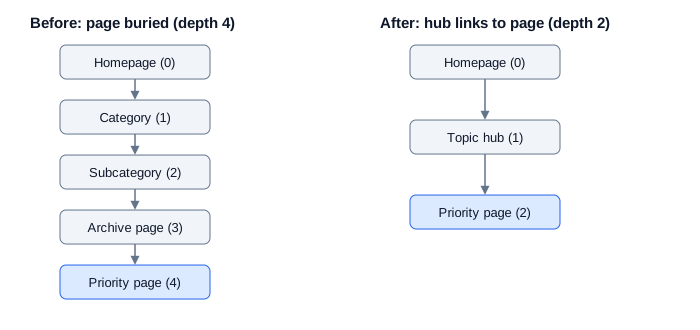
Click depth is the number of clicks it takes to reach a page from the homepage. Google asks that pages you care about be linked; it sets no maximum depth. The often-quoted “three clicks” is an industry heuristic, not a documented threshold, but the underlying idea holds: a page buried five levels down is harder for readers and crawlers to reach. If a crawl shows one, link to it from a hub, a main menu, or a well-visited related page.
Figure 1 shows the same priority page before and after a topic hub links to it directly.
Step 4: Map What Links to What
A spreadsheet is enough:
| Column | What to record |
|---|---|
| URL | The page’s address |
| Page role | Hub, supporting page, priority page or utility page |
| Primary topic | What the page is about, in plain words |
| Incoming internal links | How many pages link to it |
| Outgoing internal links | How many pages it links to |
| Click depth | Clicks from the homepage |
| Best pages to link from | Relevant existing pages that don’t link yet |
| Action and date | What you changed and when |
Here’s what a filled-in row looks like in practice. This is an illustrative example, not data from a real site:
| Source URL | Destination URL | Reason to link | Suggested anchor | Priority |
|---|---|---|---|---|
| /blog/why-sites-dont-rank/ | /internal-linking-audit/ | Mentions “pages search engines can’t find” without linking to the audit process | internal linking audit | High |
| /blog/content-strategy-2026/ | /internal-linking-strategy/ | References building a linking plan as a side note | internal linking strategy | Medium |
| /services/seo-audit/ | /internal-linking-tools/ | Lists audit deliverables but doesn’t name the tools used | internal linking tools | Low |
For each opportunity, record the source page, the destination, the reason for linking and a priority. That makes it straightforward to review the list and work through the highest-value changes first, rather than tackling them in whatever order you happen to notice them.
Step 5: Build Linking Into Your Publishing Workflow
Linking has two directions. A new post should link to related pages, and related existing pages should link back to the new post. People tend to skip the second direction, and that’s usually how newly published pages end up orphaned.
Before publishing:
- The new page links to related pages a reader would want next.
- At least one relevant existing page links to the new page.
- Anchor text makes sense read on its own.
- No link points to a redirect, a 404 or a draft.
- Every link is a real anchor element with an
href. - The link map is updated.
Internal Linking Best Practices
The previous section is the plan. This one is the craft of individual links.
Write Descriptive Anchor Text
A useful test: read only the anchor text, out of context, and check whether it tells you what’s on the other side.
| Weak anchor | Why it fails | Better |
|---|---|---|
| “click here,” “read more,” “this article” | Tells nobody what’s on the other side | “internal linking audit checklist” |
| A whole clause used as the link | Too long to scan | Trim to the phrase that names the destination |
| Several keywords packed together | Reads as forced, and brushes against Google’s keyword-stuffing spam policy | One natural phrase |
| Single words linked in a row | The reader can’t tell the links apart | Space links out with real sentences |
Advice on anchors conflicts. Some guides push the exact phrase a page targets. Google’s own guidance leans toward writing naturally. The Zyppy finding that pages with at least one exact-match anchor had roughly five times the traffic is correlational, and the study’s author names the likelier alternative explanation himself: a page someone optimized carefully in general is also the page more likely to get a careful anchor. In practice: describe the destination honestly, and when the natural description happens to match the page’s target phrase, use it. Vary the wording elsewhere.
Place Links Where They Help the Reader
The text surrounding a link shapes how it reads. Stacking several links back-to-back makes them hard to tell apart and strips away the connecting words that would normally explain each one. Put a link where a reader would naturally think, “I want more detail on that.”
Whether contextual links carry more SEO weight than navigation or footer links is a common claim, and it’s opinion — Google doesn’t say either way. Navigation still earns its place, since it helps every visitor reach the main sections.
How Many Internal Links Should a Page Have?
Google sets no target count. Its practical test is closer to a gut check: pages that feel overloaded with links usually are, whether or not you can name a specific number. Published counts elsewhere conflict because they measure two different things: most guides talk about outgoing links per article, while the Zyppy study measured incoming links per page.
| Source | What it counts | Guidance |
|---|---|---|
| Links on a page | No ideal number | |
| Ahrefs | Contextual links in an article | 3 to 5 |
| Semrush’s guide | Links on a page | 2 to 5 |
| Zyppy | Incoming links to a page | Traffic tended to peak around 40–45, then fall |
A decision rule, since the numbers above won’t settle it for you (opinion):
- For incoming links, raise the count on a priority page until every relevant page that mentions its topic actually points to it.
- For outgoing links, let the content decide. Link the first natural mention of a concept that has its own page.
- Signs of too many: links bunched together, anchors that read as forced, destinations unrelated to the sentence, readers unable to tell which link to follow next.
A four-question test for any individual link: Would a reader plausibly want this next? Does the anchor say what they’ll get? Does the sentence still make sense without the link? Is the destination the right final URL?
Should Internal Links Be Nofollow?
Google’s nofollow guidance addresses external links specifically — sources you don’t trust, paid links, user-generated content. It says nothing about internal links. Some vendor guides suggest nofollow for login or cart pages; that’s practitioner opinion. For ordinary internal links to normal content, no rel attribute is needed.
Make Links Crawlable and Accessible
- Use a real anchor element with an
href. Elements with only script click handlers aren’t reliably parsed. - For image links, Google uses the image’s
alttext as the anchor text, so describe the destination there. - Avoid empty links. Google can fall back to the
titleattribute, but visible text works better. - Descriptive link text also serves accessibility — web accessibility guidelines ask that a link’s purpose be clear from its text or immediate context, which lines up with Google’s own advice.
Internal Linking Strategy by Site Size and Type
| Site type | First priority | Tooling | Review rhythm |
|---|---|---|---|
| Small site (dozens of pages) | Make sure nothing is orphaned | Search Console, a spreadsheet | After each new post, plus a check twice a year |
| Growing content site | Link older posts to newer ones | A free or paid crawler | Quarterly |
| Ecommerce or SaaS | Connect categories, products and documentation | Crawler, site audit | After catalog or navigation changes, plus quarterly |
| Multi-author team | Agree on ownership and rules | Shared link map, checklist | Pre-publish review, plus quarterly |
Small Sites
You can do all of this by hand. The usual risks are new posts nobody links to and a menu that hides useful pages. Search Console and a spreadsheet cover the work.
Growing Content Sites
The common failure is old posts that never point to newer ones. A periodic sweep — searching your own site for mentions of a topic and linking where it helps — fixes most of it. One hub page per major topic gives related posts a home to link back to.
A crawler or paid suite starts to earn its cost at a fairly specific point: once a site holds more URLs than you can mentally track, once more than one person publishes without a shared review step, or once you genuinely can’t say what links to what without checking. That trigger is a workflow problem, not a page count — a 40-page site run by one careful editor may never need one, while a 40-page site with three contributors and no shared process might need one immediately.
Ecommerce and SaaS Sites
Relationships here are structural: products belong to categories, features belong to documentation. Links should reflect those relationships and help buyers compare related items. Google’s ecommerce documentation on site structure and pagination is worth reviewing once filters start multiplying your URL count.
Multi-Author and Team Sites
Ownership becomes necessary as soon as more than one writer is publishing. Without a single person responsible for the link map, each contributor’s sense of “relevant” starts to diverge, and the pre-publish checklist is usually the first thing skipped under deadline pressure. A one-page rule sheet — how to write anchors, what to link to, who reviews — heads this off.
How to Run an Internal Linking Audit
Start by comparing the pages that matter most to your business against the pages actually receiving the most internal links. The gap between those two lists is usually the most useful place to begin.
What to Look For
- Orphan pages that no other page links to.
- Buried pages that matter but sit many clicks from the homepage.
- Broken links and links that pass through redirects.
- Weak anchors such as “click here” or a vague single word.
- Over-linked pages where links crowd each other.
- Missed opportunities: pages that mention a topic you cover in depth elsewhere without linking to it. The sample rows in Step 4 above show what these look like once you’ve found them.
Step-by-Step Audit With Free Tools
- List your priority pages from Step 1 of the strategy.
- Open Search Console’s Links report and view internal links. Compare the pages with the most incoming internal links against your priority list — mismatches are your first findings.
- Build a list of every indexable URL from your sitemap or CMS. Any URL missing from your crawl or the Links report is an orphan candidate; the report may not list every page.
- Crawl your site with a free desktop crawler and export incoming links and click depth per URL. Check the tool’s current URL limit, since free tiers change.
- Inspect key pages with the URL Inspection tool to confirm JavaScript-inserted anchor text appears in the rendered HTML.
- Fix and log each change, with a date and a reason.
Prioritize Fixes: Impact vs. Effort
| Low effort | High effort | |
|---|---|---|
| High impact | Link orphaned priority pages from relevant pages. Fix links pointing at redirects or 404s | Restructure a hub or main navigation |
| Low impact | Tidy generic anchors on low-traffic pages | Rewrite every anchor sitewide |
Do the top-left quadrant first. Take the bottom-right only with a specific reason.
The “80/20 rule” comes up constantly in SEO searches, including around this topic — it’s a general prioritization idea, not an SEO rule from Google. Applied here, it just means starting with the small set of pages most tied to your actual goals.
Internal Linking Audit Checklist
- Every priority page has incoming links from relevant pages.
- No indexable page is an orphan.
- Important pages are not buried deep in the site.
- No internal link points to a 404 or a redirect chain.
- Generic anchors on priority pages are replaced.
- JavaScript-built links appear in the rendered HTML.
- Changes are logged with dates.
Internal Linking Tools: Free, Paid and Automated Options
Google’s own tools cover more than most people expect. The Links report in Search Console shows how your site links internally, and URL Inspection shows how Google actually renders a page. Neither suggests links for you — the judgment still has to come from someone who understands the content.
Desktop crawlers such as Screaming Frog and Sitebulb map every internal link, click depth and redirect chain across a site. Suites like Ahrefs and Semrush add scheduled audits and issue reports on top. As noted above, these become worth it once manual tracking stops being reliable — typically signaled by URL count, multiple contributors, or a publishing pace that outruns manual review, not by a fixed page threshold.
Plugins including Yoast SEO Premium, Rank Math and Link Whisper suggest related pages while you write. Vendors selling these features tend to recommend them, while Backlinko’s guide advises against relying on automation at all. Automated suggestions can genuinely save time, but their relevance depends on the page and the context they’re suggested in, so it’s worth evaluating each one against your own content and linking goals rather than accepting the default:
- Read each suggested link in context before accepting it.
- Reject matches that share words but not meaning.
- Keep anchors natural instead of accepting whatever phrase the tool proposes.
- Avoid bulk-inserting links across old posts in one pass.
| Tool type | Examples | Good for | Limits |
|---|---|---|---|
| Google’s free tools | Search Console Links report, URL Inspection | Seeing what Google reports and how it renders pages | No link suggestions. Reports may not cover every URL |
| Desktop crawlers | Screaming Frog, Sitebulb | Full-site link, depth and redirect data | Learning curve. Free versions cap URLs |
| SEO suites | Ahrefs, Semrush | Scheduled audits, team reports | Subscription cost. Free audits are limited |
| WordPress plugins | Yoast SEO Premium, Rank Math, Link Whisper | Suggesting related pages while writing | Suggestions still need a human relevance check |
Worked Example: Auditing a Small Site
The following example illustrates how an internal linking audit can work in practice. It is hypothetical and is intended to demonstrate the process, not report actual results.
A consulting firm’s blog, roughly 60 posts and one services page. The services page is the priority page. Almost nothing links to it except the footer.
The starting point. The Links report shows the posts with the most incoming links are old, general ones, while the services page has very few pointing to it. A crawl turns up two recent posts with no incoming links at all.
What changed, and why. Three fixes followed the audit: linking the services page from posts where a reader would naturally want to know what the firm does, using descriptive anchors instead of “learn more”; linking the two orphaned posts from related older posts; and fixing a handful of links pointing through redirects instead of straight to the final URL.
What could honestly be claimed afterward. If the services page gained impressions and clicks in the following weeks, that’s worth noting — it doesn’t prove the links caused it. Seasonality, other edits and Google updates all move the numbers on their own. The defensible claim is that performance changed after the links were added, with the change date on record for comparison later.
What could go wrong. Linking from irrelevant posts just to raise the count adds noise, not value. Rewriting every anchor at once makes it impossible to tell which change mattered. Adding links to a page nobody wants to read doesn’t fix the page.
How to Measure Results and Keep Links Healthy
Use the Search Console Performance report for the pages you changed: impressions, clicks and average position before and after. Use the Links report to confirm incoming internal link counts, and URL Inspection to confirm new pages are indexed and see when Google last crawled them.
Expect variation. The controlled tests earlier in this guide didn’t all show gains — one showed 7%, one showed nothing detectable, one was inconclusive for the pages receiving the links. Google publishes no timeline for how quickly link changes take effect, and a change only counts once the affected pages are recrawled. A rough control helps: compare your changed pages against similar pages you left alone over the same period.
The review rhythms in the site-type table are starting points. A handful of events should trigger a review regardless of size: publishing a cluster of posts, redesigning navigation, migrating platforms, deleting content, or changing URL structure.
A change log — date, page, change, reason — makes it easier to connect a specific edit to whatever happens afterward, and to spot which kinds of changes are worth repeating elsewhere on the site.
Common Internal Linking Mistakes
| Mistake | Why it happens | How to spot it | Fix |
|---|---|---|---|
| Orphaned pages | New posts are published and forgotten | Crawl shows zero incoming links | Link from relevant pages |
| Generic anchors | Fast writing habits | Anchors like “click here” | Rewrite to describe the destination |
| Navigation-only linking | Assuming the menu is enough | Deep pages have no contextual links | Add links in body text |
| Chained links | Listing many links in a row | Links with no words between them | Space them with real sentences |
| Over-linking | Believing more is always better | Links crowd the text | Cut the ones a reader wouldn’t follow |
| Links to redirects or 404s | Pages move without updates | Crawler flags them | Update to final URLs |
| Ignoring old posts | New content gets all the attention | Older posts never mention newer ones | Add links from older posts |
| One-size link counts | Copying a number from a guide | The same count on every page | Decide by purpose instead |
| Unreviewed automation | Accepting every suggestion | Links to loosely related pages | Review each one in context |
| Script-only links | Custom menus built without anchor elements | Links missing from rendered HTML | Use real <a href> elements |
Advanced Topics: Scale, Technical Details and AI Search
Google’s crawl budget documentation is aimed mainly at very large or fast-changing sites. For most sites the practical issue is discovery, not budget: can Google find your important pages at all? On large sites, work by template — make sure category, hub and product templates link to the items that matter, and that new pages get linked automatically rather than by hand.
For Google specifically, links inserted by JavaScript work fine as long as they use proper anchor markup, and URL Inspection lets you confirm the rendered HTML directly. In the SearchPilot test mentioned earlier, moving JavaScript-only links into the HTML made no detectable difference to organic traffic. Some SEO vendors claim non-Google crawlers may not run JavaScript at all; documentation confirming that wasn’t located for this guide, so treat it as unverified. Building links as real anchor elements from the start removes the question either way.
Pagination and faceted filters can produce huge numbers of near-duplicate URLs, and the internal links pointing to those URLs influence what gets crawled. Google publishes separate documentation on ecommerce pagination and on canonicalization, both worth reading before deciding how filtered pages should link to each other.
Do internal links still matter with AI search? Yes, because a page still has to be found and understood before it can surface anywhere in Google Search, AI Overviews and AI Mode included. Google’s generative AI guide states this directly: optimizing for its AI features is still SEO, built on the same fundamentals used for classic ranking. The guide specifically names content chunking, maintaining an llms.txt file, and pursuing inauthentic mentions as tactics that don’t help visibility in Google Search — this is a direct position from Google’s own documentation, not an inference drawn from it.
Mid-October 2026, Google also changed how AI Mode and AI Overviews display the links they show to users — surfacing inline source links more prominently and testing a dedicated section for official pages. That update concerns links Google shows from its own AI answers out to source sites, not a site’s internal linking structure, and it comes with no new action or metric for site owners to track.
The link to internal linking specifically is an inference, and a reasonable one: Google documents that it uses links to discover pages, so a page nothing links to is harder to find for any part of Search. Several vendor guides go further and claim internal links specifically raise the odds of being cited in AI-generated answers. Google’s guide doesn’t say this, and no controlled test supporting it was located for this article. What Google emphasizes instead is original content that offers something other pages don’t.
Key Takeaways and Next Steps
Internal linking rewards steady work more than clever tactics. Google documents two roles for links — discovery and context — and leaves the rest to judgment.
- Google uses links to find pages and understand them; published link-count numbers conflict mainly because they’re counting different things — incoming versus outgoing (documented).
- Priority pages need incoming links from relevant pages, not just navigation.
- A free audit with Search Console and a crawler finds most problems.
- Measure with a before-and-after comparison and a change log, and expect mixed results.
First-week plan: list your priority pages and their current incoming links, find orphaned pages, add links from relevant pages to your priorities, fix links pointing to redirects or 404s, and start the change log.
FAQs
Are internal links as valuable as backlinks?
Google doesn’t publish a direct comparison. Links from other sites are widely assumed to carry more weight for authority, but internal links are fully under your control and drive discovery in a way backlinks can’t.
How soon will link changes show up in search?
No set timeline. A change only counts once Google recrawls the affected pages, so check status with URL Inspection first, then compare performance over similar periods.
Do image links and buttons count as internal links?
Image links do, and Google uses the image’s
alttext as the anchor text. Buttons count only if built as real anchor elements with anhref— a script-only click handler isn’t reliably parsed.Do I need a paid tool to manage internal links?
Not for a small site. Search Console, a spreadsheet and a free crawler tier cover the audit work. Paid tools earn their cost once manual tracking becomes unreliable, as described in the tools section above.
📖 Continue Reading:
- Mobile-First Indexing Guide
- On-Page SEO Checklist
- Page Speed Optimization
- Technical SEO Checklist for New Websites
- Website Development Tips for SEO and Speed
Disclaimer
This guide reflects Google’s documentation and published studies as of October 18, 2026. Google’s guidance and search results change over time, and outcomes vary by site. Nothing here guarantees a ranking or traffic result.
Sources & References
- Google Search Central: Link best practices for Google
- Google Search Central: A guide to Google Search ranking systems
- Google Search Central: Optimizing for generative AI search
- Zyppy: 23 Million Internal Links, SEO Case Study
- SearchPilot: How to test internal links for SEO
- SearchPilot: SEO A/B test, server-side rendering internal links
- Ahrefs: Internal Links for SEO

Bharti Chauhan is a dedicated professional with a diverse background spanning software development, open-source contribution, and digital marketing. She holds a B.Tech degree from J.C. Bose University of Science & Technology, YMCA, where she built a strong technical foundation in computer science and engineering principles.
Bharti began her professional journey with a six-month internship in Software Development at Interface Microsystems, where she gained hands-on experience in coding practices, problem-solving, and real-world application development. This early exposure sharpened her technical skills and gave her valuable insight into the software industry.
She further strengthened her development skills through a one-year experience with GirlScript Summer of Code, contributing to web development projects as part of this open-source program, which enhanced her collaborative coding abilities and exposure to real-world projects.
Alongside her technical journey, Bharti spent two years at DigiAladin Marketing Agency as an SEO specialist, developing expertise in search engine optimization strategies, keyword research, and improving website visibility and rankings for various clients.
Today, Bharti brings a well-rounded mix of technical and digital marketing knowledge to her work, making her a versatile professional capable of bridging development and online growth strategies effectively.