⚡ Quick Answer: On-Page SEO Checklist (2026)
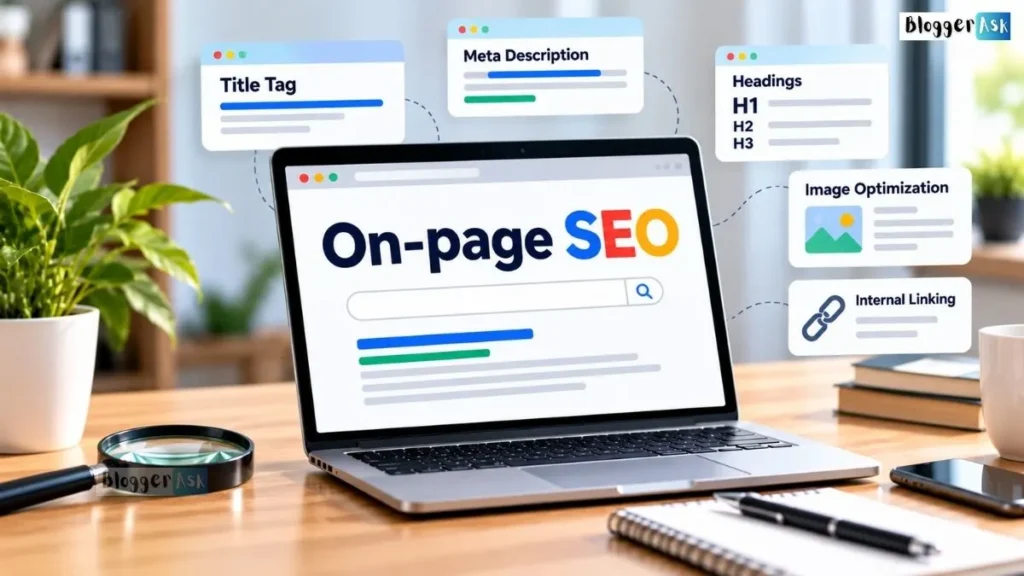
On-page SEO means optimizing the content and HTML of individual pages — titles, headings, body content, internal links, images, and page experience — so both readers and Google understand what the page is about. The highest-impact work is content quality and search intent match, followed by title tags and heading structure. Most of the rest (meta descriptions, image alt text, URL slugs, schema) affects click-through rate or crawl efficiency rather than rankings directly. A focused pass takes about 30 minutes per page.
Introduction
Most on-page SEO checklists read like inventories: thirty-some items, no order, no explanation of why item four matters more than item nineteen. A few years back that didn’t matter much — ranking factors were simpler, and nobody had to wonder whether an AI Overview was reading the page too. It doesn’t hold up now.
The list below ranks each item by purpose and evidence. Each one is tagged with what it actually does: ranking, click-through rate, crawlability, or how AI search features retrieve content. Each is also graded by how solid the evidence is, with claims linked back to Google’s own documentation at the point they’re made. Where the evidence is weaker, that’s said plainly instead of glossed over.
What Is On-Page SEO? (Definition, Scope & Why It Still Matters in 2026)
On-page SEO is the practice of optimizing elements that live directly on a web page — its content, title tag, headings, internal links, images, and HTML structure — to help both users and search engines understand and rank it. It sits inside the broader discipline of SEO alongside two other categories: off-page and technical SEO.
On-Page vs. Off-Page vs. Technical SEO
People mix these up constantly, and the boundaries aren’t always clean in practice.
| Category | What it covers | Example tasks |
|---|---|---|
| On-page SEO | Content and HTML on a specific page | Writing the title tag, structuring headings, optimizing body content, adding internal links, writing alt text |
| Off-page SEO | Signals from outside your own site | Earning backlinks, brand mentions, PR, social sharing, reviews |
| Technical SEO | Site-wide infrastructure and crawlability | Sitemaps, robots.txt, server-level speed, mobile rendering, indexing issues |
A few items blur the line on purpose. Site speed and Core Web Vitals are measured per page but usually fixed at the template or server level. Section 4 covers them, including a note on where the real fix lives. Internal links are on-page because you choose them yourself. Backlinks aren’t, because someone else does.
Does On-Page SEO Still Matter With AI Overviews and AI Mode?
Yes. Generative AI search features are built on Google’s core ranking and quality systems, according to its own guidance — the same fundamentals that earn traditional rankings are what AI Overviews and AI Mode pull from and cite (Google’s guide to optimizing for generative AI features). Section 6 covers what that actually changes in practice.
How This Checklist Works
Every item below carries an evidence tier and a function label, so you can see at a glance what you’re looking at and how solid the ground under it is.
Evidence Tiers: What’s Google-Documented, Tested, Correlational, or Folklore
Google-documented claims are stated directly in Google’s own Search Central guidance — the strongest tier, and where nearly everything here lands. Independently tested claims come from a controlled experiment rather than just an opinion. Correlational findings move together with rankings or traffic in aggregate data, without anyone proving cause and effect. Folklore is just what gets repeated in SEO circles with nothing behind it at all.
What Each Item Actually Does: Eligibility, Ranking, Snippet/CTR, or UX/AI Retrieval
A checklist item can do any of four different jobs, and a lot of SEO advice goes wrong by conflating them.
| Function | What it means | Example |
|---|---|---|
| Eligibility | Whether your page can be indexed, shown, or qualify for a feature at all | Meeting Google’s technical requirements, avoiding an accidental noindex |
| Ranking | Whether it moves you up or down against competitors | Content quality, title relevance, internal link structure |
| Snippet / CTR | Whether people click once they see you | Meta description, title phrasing |
| UX / AI retrieval | Whether people — or AI systems reading on their behalf — can actually use the page | Page speed, heading structure, mobile layout |
New Page vs. Existing Page: What Changes
For a brand-new page, work through the list in order — there’s nothing to undo. For an existing page, start with Section 3 only. Check whether the content still matches what people are actually searching for before touching titles or technical details; a perfectly optimized title sitting on thin or outdated content won’t fix the real problem underneath it.
Fast Path (30 Minutes) vs. Full Audit (90+ Minutes)
If you only have half an hour, do this:
- Read the page as if you were the searcher. Does it actually answer the query, completely, without padding? (5 min)
- Check the title tag and H1 for relevance and clarity. (3 min)
- Scan headings for logical structure — no skipped levels, no duplicate H1s. (3 min)
- Confirm 2–3 relevant internal links point to and from the page. (5 min)
- Check that images have alt text and aren’t oversized. (5 min)
- Run the URL through PageSpeed Insights and note anything flagged red. (5 min)
- Check the meta description exists and isn’t duplicated elsewhere on the site. (4 min)
A full audit adds everything in Section 4 — structured data, canonical tags, Core Web Vitals field data from Search Console, and a mobile-specific pass.
The Highest-Impact On-Page SEO Factors (Start Here)
These three on-page SEO factors carry more weight than everything else in this guide combined. Fix these before anything in Section 4.
Content Quality, Search Intent & E-E-A-T
Google is more direct here than almost anywhere else in its guidance: content people find “unique, compelling, and useful” will influence visibility “more than any of the other suggestions in this guide” (Google’s guide to optimizing for generative AI features). The line it draws is between commodity content — generic advice anyone could write — and non-commodity content built on real experience or a genuine point of view. For an on-page SEO checklist, that means:
- Match the content to what the searcher actually wants. A page targeting “on-page SEO checklist” should be a checklist, not a 3,000-word history of SEO.
- Add something a competitor’s page doesn’t have — a different angle, a correction to common misinformation, direct experience with the topic.
- Don’t pad a thin answer to hit a word count. Google’s content guidance warns against producing “content primarily to rank well in search engines rather than to help or inform people” (Creating helpful, reliable, people-first content).
Title Tags & Title Links
Your <title> element is one of several sources Google draws from to build the title link — the clickable headline in search results. Its documentation names “the main visual title, heading elements, and other large and prominent text” as inputs, and rewrites the displayed title when these signals conflict or when your H1 and <title> disagree (Influencing Title Links in Google Search).
- Write a unique title for every page — no boilerplate repeated across templates.
- Keep the title accurate to what’s actually on the page; Google names “obsolete” and “inaccurate” titles specifically as rewrite triggers.
- Put the page’s core topic early enough that it’s visible even if the SERP display truncates it.
- Write it the way you’d describe the page to a person, which is what Google’s own guidance recommends.
Headings & Content Structure
Clear headings help readers scan, and Google names heading elements directly as one signal it uses to understand and display page titles. Well-organized sections with descriptive subheadings also make it easier for AI systems doing passage-level retrieval to find and cite the part of your page that actually answers a given query.
- Use one H1 per page that reflects the core topic.
- Nest H2s and H3s logically — don’t skip from H2 straight to H4.
- Write headings that describe what’s actually in the section below them.
Fix these three first, before anything in Section 4 — they carry more weight than the rest of this checklist combined.
The Complete On-Page SEO Checklist, Element by Element
Everything that didn’t make Section 3’s top three, organized by element. Each one still matters, just less than content quality, titles, and headings.
Meta Descriptions
Function: Snippet/CTR only. Meta descriptions don’t affect rankings — their only job is influencing whether someone clicks once they see the result.
- Write a unique meta description for every important page.
- Describe what the page actually delivers, in plain language — not a keyword list.
- Don’t duplicate the same description across multiple pages; it wastes the opportunity and can look templated.
Google sometimes swaps in an auto-generated snippet instead of your written description, when it judges that’s a better match for the query. Write one well anyway — it’s the strongest default Google has to work from.
URL Structure
Function: Low-impact eligibility and minor UX signal.
- Keep URLs short and descriptive — readable by a human at a glance.
- Use hyphens to separate words, not underscores or spaces.
- Avoid stacking unnecessary parameters or session IDs into indexable URLs.
- Keep the URL stable once published; changing it later means managing redirects.
Internal Linking & Anchor Text
Function: Ranking (helps Google understand page relationships and distribute authority) and crawl efficiency.
- Link to the page from at least 2–3 other relevant pages on your site.
- Use descriptive anchor text that names the destination topic — not “click here.”
- Avoid orphan pages with zero internal links pointing to them.
- Don’t force links into irrelevant context just to hit a count.
Image SEO: Alt Text, File Names, Compression
Function: Accessibility (primary), UX/page speed (secondary), and eligibility for image search.
- Write descriptive alt text for every meaningful image — what it shows, not a keyword-stuffed phrase.
- Leave alt text empty, not filled with filler, for purely decorative images.
- Use descriptive file names before uploading, not “IMG_4821.jpg.”
- Compress images and serve modern formats (WebP/AVIF) where supported.
Structured Data / Schema Markup — Current 2026 Guidance
Function: Eligibility for specific rich results only — not a ranking factor, and not required for AI search visibility.
Structured data is another area where old SEO advice lingers. The timeline is worth knowing exactly:
- August 2023 — Google restricted FAQ rich results to a narrow set of authoritative government and health sites, and removed HowTo rich results entirely, for every site (How to prepare for the upcoming change to FAQ and HowTo rich results).
- May 7, 2026 — Google retired FAQ rich results completely, including for the government and health sites that had remained eligible. Search Console’s FAQ report and the Rich Results Test lost FAQ support in June 2026, with Search Console API support following in August 2026 (Google Search Central documentation updates).
- FAQPage schema is still a valid structured data type, and Google says it continues using it to help understand page content — it just no longer produces the visible dropdown in results.
Apply structured data only where it reflects content genuinely present and visible on the page; Google’s guidelines are explicit that markup must match what a visitor actually sees (Structured data general guidelines).
- Use Article schema for blog or guide content if your CMS supports it cleanly.
- Don’t add FAQ or HowTo schema expecting a rich-result boost — that mechanism is gone.
- Validate any schema you do add with the Rich Results Test.
Core Web Vitals & Page Experience
Function: UX. Google describes it as one input that aligns with what core ranking systems reward, not a dominant ranking factor by itself.
Google currently defines three Core Web Vitals and gives each a “good” threshold:
| Metric | Measures | Good threshold |
|---|---|---|
| Largest Contentful Paint (LCP) | Loading speed | 2.5 seconds or less |
| Interaction to Next Paint (INP) | Responsiveness | 200 milliseconds or less |
| Cumulative Layout Shift (CLS) | Visual stability | 0.1 or less |
(Core Web Vitals — Google Search Central)
- Check field data (real-user measurements) in Search Console’s Core Web Vitals report — PageSpeed Insights’ lab scores are diagnostic, not the ranking input itself.
- Fix the biggest contentful element if LCP is slow — usually a hero image or web font.
- Reduce layout shift by setting explicit width/height on images and ads.
Mobile-Friendliness & Accessibility
Function: Eligibility (mobile-first indexing means Google primarily uses the mobile version of your page) and UX.
- Confirm the page renders correctly and is usable on a phone, not just resized.
- Check that tap targets aren’t too small or crowded together.
- Use semantic HTML where practical. It doesn’t need to be perfect — Google says so directly — but it helps screen readers parse the page.
Canonical Tags & Duplicate Content
Function: Eligibility and crawl efficiency — tells Google which version of near-duplicate content to index when more than one exists.
- Set a self-referencing canonical tag on unique pages.
- Point canonicals to the preferred URL when the same content is reachable through multiple paths (parameters, trailing slashes, http/https).
- Check Search Console’s Pages report for duplicate content flagged without a user-selected canonical.
On-Page SEO Factors, Ranked: The Full Priority Table
| Item | Function | Evidence Tier | Impact | Effort | How to Verify |
|---|---|---|---|---|---|
| Content quality, intent match, E-E-A-T | Ranking + AI retrieval | Google-documented | High | High | Search Console Performance; manual intent check against top-ranking pages |
| Title tag / title link | Ranking + Snippet/CTR | Google-documented | High | Low | View page source; Search Console CTR by page |
| Headings & content structure | UX + AI retrieval | Google-documented | High | Medium | View page source / browser outline |
| Internal linking & anchor text | Ranking | Google-documented | Medium | Medium | Manual site crawl or free crawler (sub-500 URL tier) |
| Image SEO (alt text, compression) | Accessibility + UX | Google-documented | Medium | Low | PageSpeed Insights; Inspect Element |
| Mobile-friendliness & accessibility | Eligibility + UX | Google-documented | Medium | Medium | PageSpeed Insights mobile tab; manual phone test |
| Core Web Vitals / page experience | UX | Google-documented | Low–Medium | Medium–High | Search Console Core Web Vitals report |
| Canonical tags / duplicate content | Eligibility | Google-documented | Low–Medium | Medium | View page source; Search Console Pages report |
| Meta description | Snippet/CTR only | Google-documented | Low–Medium | Low | View page source; Search Console CTR |
| URL structure | Eligibility | Google-documented | Low | Low | Browser address bar |
| Structured data / schema | Eligibility (rich results only) | Google-documented | Low | Low–Medium | Rich Results Test |
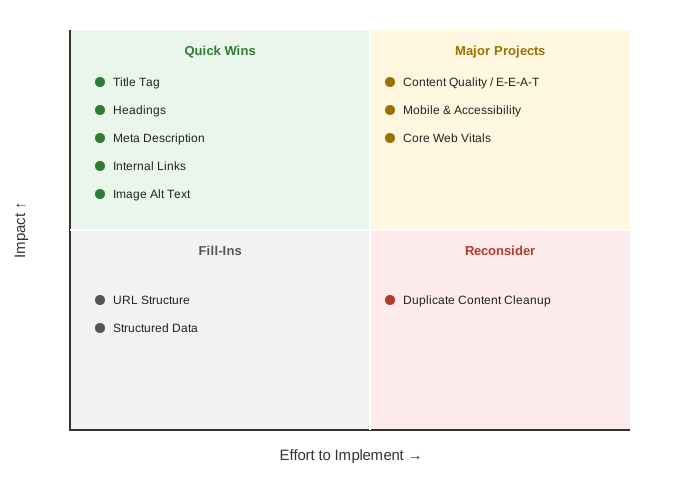
If you’re deciding what to fix first, this grid gives you the short version.
On-Page SEO and AI Search: What to Do, Ignore, and Avoid in 2026
Google’s generative AI guidance doesn’t call for a separate playbook. It’s mostly the checklist above, plus a few specifics worth knowing.
What Still Matters in AI Search
- Standard SEO fundamentals, which Google states “continue to be relevant” because AI features are built on the same core ranking systems.
- Non-commodity content with a genuine point of view — the single highest-leverage factor named in the entire guide.
- Standard technical requirements. A page has to be indexed and snippet-eligible to appear in AI features at all, which is just the normal bar for regular search.
- The Generative AI performance report in Search Console, for seeing how content performs specifically in AI features rather than guessing from organic traffic alone.
AI SEO Tactics You Don’t Need
There are four commonly recommended tactics you can safely skip:
- llms.txt and similar “AI text files”: not read or used by Google Search at all — creating one neither helps nor hurts your visibility there.
- “Chunking” content into tiny fragments for AI: not necessary. Google’s systems already handle multi-topic pages and surface the relevant section without you pre-slicing anything.
- Rewriting content specifically for AI phrasing patterns: also unnecessary — its systems understand synonyms and general meaning, not just exact keyword matches.
- Piling on structured data beyond what’s genuinely useful: doesn’t earn AI citations. Worth keeping for standard rich-result eligibility, but it isn’t a lever for generative AI visibility specifically.
Where the Line Is
Building a separate page for every query variation someone might search, hoping to catch extra fan-out traffic, crosses a real line. Google classifies that as scaled content abuse when it’s done primarily to manipulate rankings, and treats it as a spam policy violation rather than just a weak tactic.
Chasing inauthentic mentions across blogs, forums, and review sites to manufacture the appearance of authority runs into the same problem. Google’s spam systems are built to catch exactly that kind of manufactured signal.
AI-assisted content doesn’t get a pass either. It still has to clear the same Search Essentials and spam policy bar as anything written by hand.
For AI search, the fundamentals remain the same.
How to Verify Your On-Page SEO (Free and Paid Tools)
Free Tools: Search Console, PageSpeed Insights, Rich Results Test
- Google Search Console — Performance report for clicks/impressions/CTR by page, URL Inspection for indexing status, and the Core Web Vitals and Generative AI performance reports for the two areas covered above.
- PageSpeed Insights (pagespeed.web.dev) — lab and field performance data per URL, free, no account required.
- Rich Results Test (search.google.com/test/rich-results) — validates whether your structured data is eligible for any currently supported rich result.
- Browser DevTools or “View Page Source” — the fastest, no-cost way to confirm your title tag, meta description, H1, and alt text are actually what you think they are.
There Is No Official On-Page SEO Score
Numeric “scores” come entirely from third-party tools, each using its own weighting, so two tools will often grade the same page differently. Treat a tool’s score as a rough guide to what you might have missed, not a number worth chasing for its own sake.
Paid Tools: When They’re Worth It
A paid crawler earns its cost somewhere past a few dozen pages, once hand-checking stops being realistic, or once you need ongoing rank tracking against competitors. For a single site or occasional audit, the free tools above are usually enough.
On-Page SEO Checklist Examples by Page Type
Here’s how the priorities above play out across three common page types.
Blog Post / Article Example
Content quality and intent match dominate here more than anywhere else — a reader lands on an article wanting the answer fast, not a scroll through throat-clearing. Heading structure and a clear opening paragraph matter more than usual for that reason. Internal links to related posts help both the reader and crawl depth.
Local Service Page Example
A slow local page loses mobile visitors who are often searching from a parking lot or a job site, so page experience carries more weight here than elsewhere. Titles and headings should reflect the service and area without stuffing in every nearby city name. This page type also leans more on off-page signals — reviews, business profile accuracy — than on-page work alone can fix.
Ecommerce Product Page Example
Product pages have one problem blog posts usually don’t: dozens of near-identical URLs for size and color variants. Canonical tags matter more here as a result. Unique, specific product content beats templated manufacturer descriptions duplicated across dozens of retailers, and image quality plus alt text carry extra weight since product images are often what surfaces in image search.
Cost, Timeline & DIY vs. Hiring
How Much On-Page SEO Costs
Actual pricing varies by scope, provider, and site size. DIY costs only your time. A freelancer audit for a handful of pages commonly runs a few hundred dollars, while an ongoing agency retainer covering full-site SEO — on-page plus technical and content strategy together — tends to land in four figures monthly.
How Long It Takes to See Results
On-page changes don’t produce instant movement. Google has to recrawl the page, which can happen within days for an active site or take longer for one crawled infrequently, and ranking shifts typically take several weeks to fully show up even after that. Content and structural changes — Section 3’s top three — tend to move faster than smaller technical fixes like a meta description rewrite.
DIY vs. Freelancer vs. Agency
| Option | Best fit when | Trade-off |
|---|---|---|
| DIY | Single site, time available, willing to learn the tools | Slower initial ramp-up; no second opinion on judgment calls |
| Freelancer | A few pages or a one-time audit, budget-conscious | Quality varies by individual; less bandwidth for large sites |
| Agency | Many pages, ongoing need, limited internal time | Highest cost; requires vetting to avoid vague, unverifiable promises |
On-Page SEO Mistakes & Outdated Advice to Retire in 2026
Outdated Advice You Can Stop Following
| Old advice | Why it’s outdated | What to do instead |
|---|---|---|
| Add FAQ schema for the accordion rich result | FAQ rich results stopped appearing entirely on May 7, 2026 — even for the government/health sites that had remained eligible since 2023 | Use FAQ-style content for readers if genuinely useful; don’t add the schema expecting a visual result |
| Add HowTo schema for step rich results | Removed for every site in August 2023 | Write clear numbered steps for readers instead; the schema produces nothing visually now |
| Hit a specific keyword density percentage | Not a Google ranking method; can produce unnatural, repetitive writing | Write naturally — Google’s systems handle synonyms and related meaning without exact repetition |
| Create an llms.txt or similar “AI optimization” file | Google Search doesn’t read these files at all | Spend the time on content quality and technical crawlability instead |
| Chunk content into tiny fragments for AI parsing | Google states its systems already understand multi-topic pages without this | Structure for human readers with clear headings; length should fit the topic, not a formula |
Common Execution Mistakes
- Optimizing a title tag while leaving the H1 mismatched, which Google flags as a trigger for rewriting the displayed title anyway.
- Writing alt text as a keyword list instead of an actual description of the image.
- Adding internal links in bulk at the end of a project instead of naturally while writing, which tends to produce forced, awkward anchor text.
- Treating a single PageSpeed Insights lab score as the full picture, when Search Console’s field data reflects what real visitors actually experienced.
The Full On-Page SEO Checklist (Downloadable Summary)
Highest impact — do these first:
- Content matches search intent completely, with a genuine point of view
- Title tag is unique, accurate, and matches the H1
- Headings are logically structured, one H1 per page
Core checklist — element by element:
- Meta description is unique and descriptive
- URL is short, readable, and stable
- 2–3+ relevant internal links point to and from the page
- Images have descriptive alt text and are compressed
- Structured data (if used) matches visible content — no FAQ/HowTo markup for rich results
- LCP ≤ 2.5s, INP ≤ 200ms, CLS ≤ 0.1 (Search Console field data)
- Page is genuinely usable on mobile, not just resized
- Canonical tag is set correctly; no unintended duplicate content
Verify before you call it done:
- Checked in Search Console: indexing status, Core Web Vitals, Generative AI performance report
- Checked in PageSpeed Insights and Rich Results Test
Conclusion
Content quality and intent match decide more of this than anything else on the page. Get the title and headings right, and most of what’s left in this guide is maintenance — worth doing, but not worth losing sleep over. Start with Section 3, check the priority table when deciding what’s next, and don’t feel obligated to clear every box in one sitting.
FAQs
Is on-page SEO a one-time task or ongoing work?
Ongoing. Revisit important pages when their intent, facts, competitors, or the search results around them change — a page that was strong six months ago may not answer the query as well today.
What’s the single first thing to fix if I can only do one?
Content-to-intent match, by a wide margin. A technically clean page built around content nobody actually wanted won’t rank, no matter how well the rest of this checklist is executed.
Can AI write my on-page content for me?
It can help you draft faster. What it produces still needs to clear the same bar as anything typed by hand — Google doesn’t grade AI-assisted work on a curve.
Does fixing Core Web Vitals guarantee a ranking boost?
Not by itself. Google treats page experience as something that supports what its ranking systems already reward, not as a factor heavy enough to outweigh weaker content.
Do I need an SEO tool to do any of this?
No paid one. Everything in this guide can be verified with Search Console, PageSpeed Insights, the Rich Results Test, and your browser’s view-source — all free.
Is FAQ schema still worth adding to a page in 2026?
Not for a rich result — that stopped appearing in May 2026. The schema type itself is still valid, and Google says it keeps using it to read page content, so leaving it on a page that already has it won’t hurt anything. Adding it now specifically to chase the old dropdown effect would just be wasted effort.
📖 Continue Reading:
- Page Speed Optimization
- Mobile-First Indexing Guide
- Technical SEO Checklist for New Websites
- Website Development Tips for SEO and Speed
Disclaimer
This guide reflects Google’s published Search Central guidance as of October 2026. Google’s ranking systems, documentation, and AI features change over time; specific thresholds, tool names, and policy details may be updated after publication. This content is educational and does not guarantee any specific ranking outcome.
Sources & References
- Google’s guide to optimizing for generative AI features on Google Search — Google Search Central
- Creating helpful, reliable, people-first content — Google Search Central
- Influencing Title Links in Google Search — Google Search Central
- Structured data general guidelines — Google Search Central
- How to prepare for the upcoming change to FAQ and HowTo rich results — Google Search Central Blog, August 2023
- Google Search Central documentation updates — FAQ rich result retirement notice, May 2026
- Core Web Vitals — Google Search Central

Bharti Chauhan is a dedicated professional with a diverse background spanning software development, open-source contribution, and digital marketing. She holds a B.Tech degree from J.C. Bose University of Science & Technology, YMCA, where she built a strong technical foundation in computer science and engineering principles.
Bharti began her professional journey with a six-month internship in Software Development at Interface Microsystems, where she gained hands-on experience in coding practices, problem-solving, and real-world application development. This early exposure sharpened her technical skills and gave her valuable insight into the software industry.
She further strengthened her development skills through a one-year experience with GirlScript Summer of Code, contributing to web development projects as part of this open-source program, which enhanced her collaborative coding abilities and exposure to real-world projects.
Alongside her technical journey, Bharti spent two years at DigiAladin Marketing Agency as an SEO specialist, developing expertise in search engine optimization strategies, keyword research, and improving website visibility and rankings for various clients.
Today, Bharti brings a well-rounded mix of technical and digital marketing knowledge to her work, making her a versatile professional capable of bridging development and online growth strategies effectively.